
GoFiber + MongoDB + JWT: Scalable API with Clean Architecture
GoFiber + MongoDB + JWT: Scalable API with Clean Architecture
A clean and modular REST API boilerplate built with GoFiber, MongoDB, and JWT Authentication using Clean Architecture principles.

Table Of Content
- Introduction
- Project Solution
- Prerequisites
- Project Struct
- Docker
- MongoDB
- Sample Response
- Todos
- Making a conclusion
Introduction
In this article, I walk you through the development of a scalable and maintainable REST API using GoFiber, MongoDB, and JWT authentication — all structured with the Clean Architecture approach.
The goal? To create a backend that’s not just fast and functional, but also easy to extend, test, and deploy in production environments.
Whether you’re new to Go or looking to apply architectural best practices in your projects, this article covers:
- Why Clean Architecture matters
- How to structure your Go project for separation of concerns
- Implementing user registration and login with secure JWT-based auth
- Setting up MongoDB integration
- Dockerizing your app for smooth development and deployment
- Handling errors and responses in a unified way
The final result is a modular API you can use as a strong foundation for real-world production systems.
Let’s dive into the code and best practices!
Project Struct
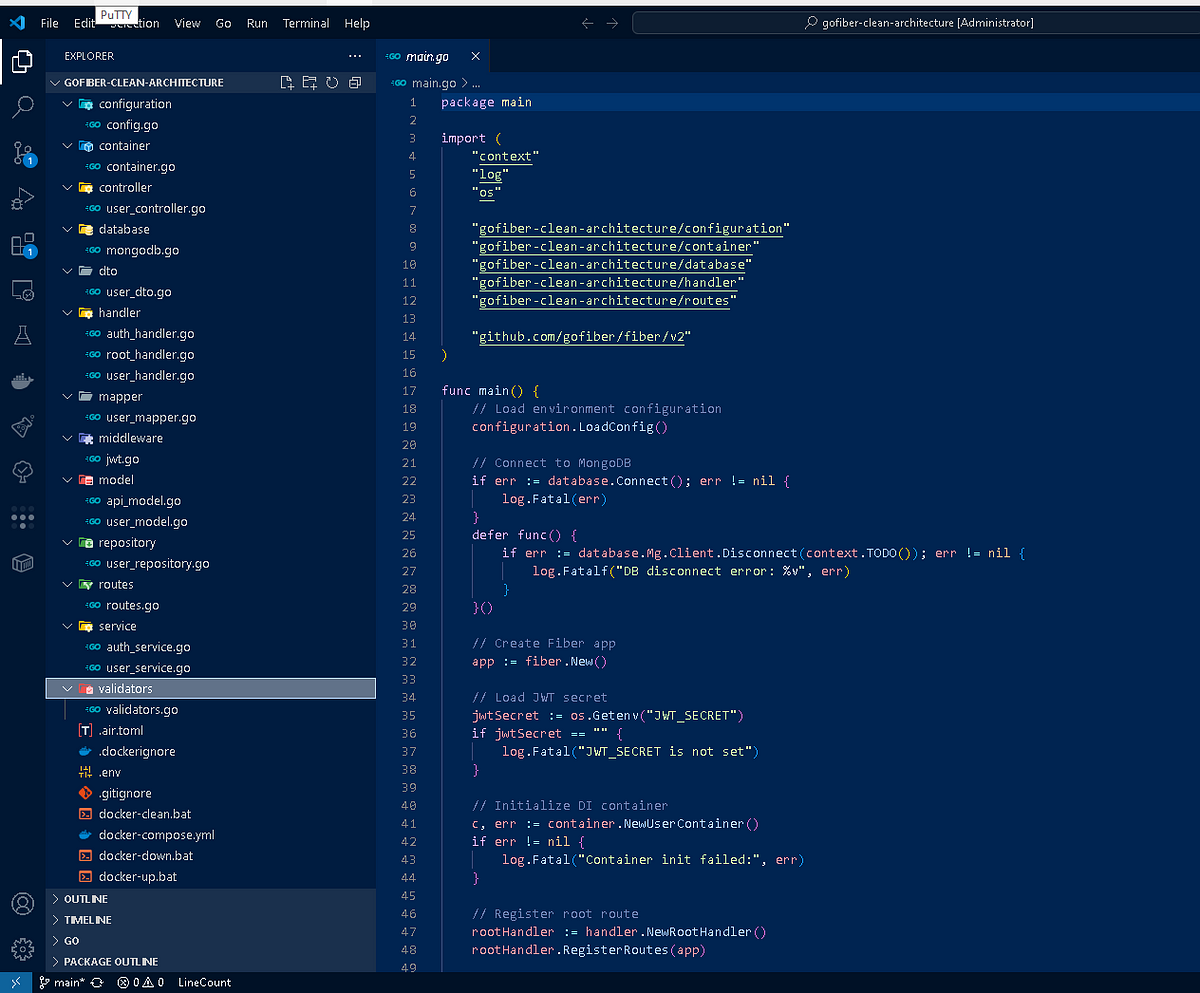
The project follows Clean Architecture principles, separating responsibilities into layers like handler, service, repository, and model. Here’s a simplified breakdown with real examples:
Please change .env setting your project security !
🚀 Features
- ✅ JWT authentication with middleware protection
- ✅ MongoDB integration
- ✅ Modular clean architecture
- ✅ DTOs and model mappers
- ✅ Dependency injection container
- ✅ Docker support (
docker-compose up --buildordocker-compose down)
Project Folder
gofiber-clean-architecture/
│
├── main.go                     # Entry point of the application
│
├── configuration/             # Loads environment and app config
│   └── config.go
│
├── database/                  # MongoDB setup and connection logic
│   └── mongodb.go
│
├── model/                     # Domain models (e.g., User, APIResponse)
│   └── user_model.go
│
├── dto/                       # Data Transfer Objects (for requests/responses)
│   └── user_dto.go
│
├── handler/                   # Fiber route handlers (controller layer)
│   ├── auth_handler.go        # Handles /auth/login and /auth/register
│   └── user_handler.go        # Handles protected /user/:id endpoint
│
├── service/                   # Business logic (use cases)
│   ├── auth_service.go
│   └── user_service.go
│
├── repository/                # DB access layer
│   └── user_repository.go
│
├── middleware/                # JWT verification logic
│   └── jwt.go
│
├── routes/                    # Route grouping and mounting
│   └── routes.go
│
├── container/                 # Dependency injection and wiring
│   └── container.go
Example Routes
GET /→ Hello Api PagePOST /auth/register→ Registers a userPOST /auth/login→ Returns JWT tokenPOST /user/:id→ Protected route, requires valid JWT
Each layer talks only to the layer directly below it, maintaining a clean and testable separation of concerns.
✅ Unified API Response Format
All endpoints return a standardized JSON
response using the ApiResponse model:
package model

type APIResponse struct {
 Status  string      `json:"status"` // "success" or "error"
 Message string      `json:"message"`
 Data    interface{} `json:"data,omitempty"`  // optional, only included for success
 Error   string      `json:"error,omitempty"` // optional, only included for error
}
📌 Success Example
{
  "status": "success",
  "message": "User fetched successfully",
  "data": {
    "userid": "682daf193f5a8fcb18943a2e",
    "username": "john_doe",
    "email": "[email protected]"
  }
}
❌ Error Example
{
  "status": "error",
  "message": "Failed to authenticate user",
  "error": "Invalid email or password"
}
💡 Benefits
- Consistent response structure across all endpoints
- Easier error handling on frontend or client apps
- Cleaner separation of
messagevs.errorvs.data
How a Request Handle ?
To help you understand how a request is
executed in your GoFiber Clean Architecture API — let’s walk through an example request to the /auth/login endpoint with a complete code flow explanation from entrypoint to response.
✅ Request:
POST /auth/login HTTP/1.1
Content-Type: application/json
{
  "email": "[email protected]",
  "password": "secret"
}
🧭 Execution Flow:
1. Request hits Fiber route (📁 handler/auth_handler.go)
const (
 RegisterRoute       = "/auth/register"
 LoginRoute          = "/auth/login"
 LoginSuccessMessage = "Login successful"
 RegisterSuccessMsg  = "User registered successfully"
)

type AuthHandler struct {
 service service.AuthService
}

func NewAuthHandler(service service.AuthService) *AuthHandler {
 return &AuthHandler{service: service}
}

func (h *AuthHandler) RegisterRoutes(app *fiber.App) {
 app.Post(RegisterRoute, h.RegisterUser)
 app.Post(LoginRoute, h.LoginUser)
}
2. Controller/Handler function (📁 handler/auth_handler.go)
func (h *AuthHandler) LoginUser(c *fiber.Ctx) error {
 var req dto.LoginRequest

 // Parse body
 if err := c.BodyParser(&req); err != nil {
  return c.Status(fiber.StatusBadRequest).JSON(model.APIResponse{
   Status:  "error",
   Message: "Malformed JSON in request payload",
  })
 }

 // Basic required fields check
 if req.Email == "" || req.Password == "" {
  return c.Status(fiber.StatusBadRequest).JSON(model.APIResponse{
   Status:  "error",
   Message: "Both email and password are required",
  })
 }

 // Call service to login user
 user, err := h.service.LoginUser(c.Context(), req.Email, req.Password)
 if err != nil {
  log.Printf("Login error: %v", err)
  return c.Status(fiber.StatusUnauthorized).JSON(model.APIResponse{
   Status: "error",
   Error:  "Invalid email or password",
  })
 }

 if user == nil {
  return c.Status(fiber.StatusInternalServerError).JSON(model.APIResponse{
   Status: "error",
   Error:  "An unexpected error occurred",
  })
 }

 jwtToken, err := middleware.GenerateJWT(user.ID.Hex(), user.Username)

 if err != nil {
  log.Printf("Token generation error: %v", err)
  return c.Status(fiber.StatusInternalServerError).JSON(model.APIResponse{
   Status: "error",
   Error:  "Failed to generate token",
  })
 }

 // Success response with user data
 return c.Status(fiber.StatusOK).JSON(model.APIResponse{
  Status:  "success",
  Message: LoginSuccessMessage,
  Data: map[string]interface{}{
   "userid":   user.ID,
   "username": user.Username,
   "email":    user.Email,
   "token":    jwtToken,
  },
 })
}
3. Service layer (📁 service/auth_service.go)
// LoginUser checks the email and password, returning the user if successful
func (s *authService) LoginUser(ctx context.Context, email, password string) (*model.User, error) {
 user, err := s.userRepository.FindByEmail(ctx, email)
 if err != nil || user == nil {
  if err == mongo.ErrNoDocuments {
   return nil, errors.New("invalid email or password")
  }
  return nil, err
 }

 // Compare passwords
 if bcrypt.CompareHashAndPassword([]byte(user.Password), []byte(password)) != nil {
  return nil, errors.New("invalid email or password")
 }

 return user, nil
}
4. Repository layer (📁 repository/user_repository.go)
func (r *userRepository) FindByEmail(ctx context.Context, email string) (*model.User, error) {
 var user model.User

 email = strings.ToLower(email)

 err := r.collection.FindOne(ctx, bson.M{"email": email}).Decode(&user)
 if err != nil {
  return nil, err
 }
 return &user, nil
}
5. JWT Generation (📁 middleware/jwt.go)
func GenerateJWT(userID, username string) (string, error) {
 jwtSecret := []byte(configuration.Get("JWT_SECRET"))
 token := jwt.NewWithClaims(jwt.SigningMethodHS256, jwt.MapClaims{
  "userid":   userID,
  "username": username,
  "exp":      time.Now().Add(72 * time.Hour).Unix(),
 })
 return token.SignedString(jwtSecret)
}
🔁 Response Example
{
  "status": "success",
  "message": "Login successful",
  "data": {
    "userid": "682daf193f5a8fcb18943a2e",
    "username": "john_doe",
    "email": "[email protected]",
    "token": "eyJhbGciOiJIUzI1NiIs..."
  }
}
Docker
if you are use windows docker-up.bat or
docker-compose up --build
if you are use windows docker-down.bat or
docker compose down
MongoDB
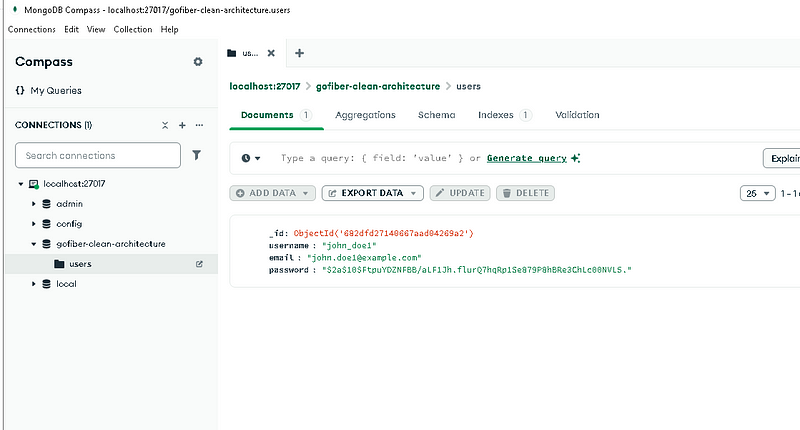
I was used MongoDB Compass for accessing data. Easily explore and manipulate your database with Compass, the GUI for MongoDB. Intuitive and flexible, Compass provides detailed schema visualizations, real-time performance metrics, sophisticated querying abilities, and much more.
Sample Response
📌 Success Example => GET /

📌 Success Example => POST /auth/register

❌ Error Example => POST /auth/register

📌 Success Example => POST /auth/login

❌ Error Example => POST /auth/login

📌 Success Example => POST /user/@userid

❌ Error Example => POST /user/@userid

Todos
- ✅ Centralized Error Handling: Implement a global error handler middleware for consistent and clean error responses.
- ✅ Refactor to Follow SOLID Principles:
- Single Responsibility (SRP): Ensure each package/component has one well-defined responsibility.
- Open/Closed (OCP): Make modules extensible without modifying existing code.
- Interface Segregation (ISP): Use smaller, focused interfaces for better testability.
- Dependency Inversion (DIP): Depend on abstractions, not concrete implementations.
- ✅ Validation Layer: Add reusable request validators using a middleware pattern.
- ✅ DTO & Mapper Enhancements: Improve separation between internal models and external API contracts.
- ✅ Swagger/OpenAPI Documentation: Generate and serve API documentation automatically.
- ✅ Logging Middleware: Add structured logging for requests, responses, and errors.
- ✅ Request ID Tracing: Correlate logs with unique request IDs for debugging.
- ✅ Unit and Integration Tests: Cover services, handlers, and middleware with tests.
- ✅ Config Improvements: Centralize configuration management with profiles (dev/test/prod).
- ✅ Makefile / CLI Tooling: Add helper commands for build, lint, and test.
Making a conclusion
👨👦👦 Leave a comment, I am free for discussion with your any kind technical question.
#GoFiber #MongoDB #JWT #CleanArchitecture #GoLang #RESTAPI #BackendDevelopment #SoftwareArchitecture #WebDevelopment #OpenSource