
The Art of Programming: Balancing Code Quality, Focus & Growth
The Art of Programming: Balancing Code Quality, Focus & Growth
“Any fool can write code that a computer can understand. Good programmers write code that humans can understand.”
― Martin Fowler

Preface
Code is more than mere directions for a computer — it’s a reflection of how we think. Every line we write is a window into our minds, our values, and our understanding. And the most difficult thing? Expressing complex ideas in the simplest, most obvious way possible. That’s where magic lies.
Beautiful, efficient, clean code is a subtle masterpiece. It does not scream for attention, and yet it’s impossible to ignore. It simply feels right.
Yet this is the thing: coding obtuse, over-engineered solutions to sound smart isn’t genius — it’s ego. True skill is in clarity, not in complexity. Expertise is in making things easy to understand, not hard to decode.
This article assumes you already have some programming experience under your belt — maybe a “Hello, World!” or so ?
Table of contents
1-) Code Clarity & Complexity
Understanding
algorithmic complexity, readability, and maintainability with real-world examples (like Duff’s Device and
power-of-two checks).
2-) Core Principles for Clean Code
- KISS — Keep It Simple, Stupid
- DRY — Don’t Repeat Yourself
- YAGNI — You Aren’t Gonna Need It
- SOLID — 5 powerful object-oriented design principles
3-) Software Design Best Practices
How to apply
principles like Separation of Concerns, the Law of Demeter, and clean architecture patterns.
4-) Design Patterns & Anti-Patterns
Recognize
effective solutions — and common traps — so you can design better systems and avoid spaghetti code.
5-) Work-Life Balance for Developers
Avoid burnout,
improve focus, and cultivate a healthy growth mindset that sustains you long-term.
6-) Recommended Learning Channels
A hand-picked list of
YouTube channels and developers worth following to keep improving.
Understanding Code Complexity
Code complexity refers to how difficult it is to understand, keep up with, and optimize a codebase. It varies on factors like code structure, readability, scalability, and performance. There are multiple ways of measuring code complexity both in terms of computer science as well as math that make quantifying and comparing how “complex” the code is possible. I just only share 3 important section.
Algorithmic Complexity:
Writing maintainable code is essential for ensuring long-term success and stability in software development. When we aim for maintainable code, we want it to be fast, resilient, and secure. Here’s a breakdown of how to achieve these objectives:
Duff’s
Device :
Duff’s problem was
to copy 16-bit unsigned integers (“shorts” in most C implementations) from an array into a memory-mapped
output register, denoted in C by a pointer. His original code, in C.
How many developer can understand what happen in here. This code is the masterpiece but Nowadays many developer try develop complex code and becoming codding ninja to seem smart.
“All Premature Optimization Is the Root of All Evil”
–Donald Knuth
//Duff's Device code.
//after duff's solution c language memcpy function replaced this implementation
send(to, from, count)
register short *to, *from;
register count;
{
    register n = (count + 7) / 8;
    switch (count % 8) {
    case 0: do { *to = *from++;
    case 7:      *to = *from++;
    case 6:      *to = *from++;
    case 5:      *to = *from++;
    case 4:      *to = *from++;
    case 3:      *to = *from++;
    case 2:      *to = *from++;
    case 1:      *to = *from++;
            } while (--n > 0);
    }
}
Another example is checking whether a given number is a power of two. The first function, in this case, is more readable and easier to test.
If your solution feels complicated or messy, don’t settle — refactor. Then refactor again. Keep going until it feels simple and clear.
//Same Result different way
boolean isPowerOfTwo_EastWay(int n)
{
    if (n <= 0)
        return false;

    // A number is a power of two if it has only one bit set
    return (n & (n - 1)) == 0;
}

boolean isPowerOfTwo_HardWay(int x){
          return !(x & (x-1));
}
Cyclomatic Complexity
Cyclomatic complexity is a metric used to measure the complexity of a program by counting the number of linearly independent paths through the code. It reflects how difficult it is to test and maintain the code based on the number of decision points (if-else statements, loops, etc.).
Mathematically: Cyclomatic Complexity (V) = E — N +
2P
Where:
- E = Number of edges in the flow graph (transitions between blocks)
- N = Number of nodes in the flow graph (basic blocks)
- P = Number of connected components (usually P = 1 for a single program)
For example, consider the following function:
public static bool SearchMatrix(int[][] matrix, int target)
{
    for (int i = 0; i < matrix.Length; i++)             // 1 decision point
    {
        for (int j = 0; j < matrix[i].Length; j++)      // 1 decision point
        {
            if (matrix[i][j] == target)                 // 1 decision point
            {
                return true;
            }
        }
    }
    return false;
}
Using the formula: V(G)=E−N+2P= 3 (decision points) + 1 = 4
Cyclomatic Complexity (V) = 4
4 is a low complexity value — this function is easy to test and maintain.This is well within the ideal range for maintainable code (aim for CC ≤ 10 per method, as a rule of thumb).
More Complex Sample
i was append comment CC point.
public class OrderProcessor
{
    public string ProcessOrder(Order order)
    {
        if (order == null) return "Invalid";                             // +1
        if (order.Status == "Cancelled") return "Cancelled";             // +1

        if (order.TotalAmount > 1000)                                    // +1
        {
            if (order.IsInternational)                                   // +1
            {
                if (order.Customer.IsVIP)                                // +1
                {
                    ApplyDiscount(order);
                }
                else if (order.Customer.HasLoyaltyPoints)                 // +1
                {
                    RedeemPoints(order);
                }
                else                                                      // +1
                {
                    Log("International order with no discount");
                }
            }
            else                                                          // +1
            {
                if (order.Items.Count > 10)                               // +1
                    ApplyBulkDiscount(order);
                else if (order.Items.Count == 0)                          // +1
                    return "NoItems";
                else                                                      // +1
                    Log("Normal large order");
            }
        }

        foreach (var item in order.Items)                                // +1
        {
            if (!item.IsInStock)                                         // +1
            {
                if (item.IsBackorderable)                                // +1
                    MarkAsBackordered(item);
                else if (item.IsDiscontinued)                            // +1
                    return "DiscontinuedItem";
                else                                                     // +1
                    return "OutOfStock";
            }
        }

        if (order.ShippingOption == "Express")                           // +1
        {
            if (order.ShippingAddress.Country == "US")                   // +1
                SetExpressShipping(order);
            else if (order.ShippingAddress.Country == "CA")              // +1
                SetExpressShipping(order);
            else                                                         // +1
                return "ExpressNotAvailable";
        }

        if (order.PaymentMethod == "CreditCard")                         // +1
        {
            if (!ValidateCard(order.CreditCard))                         // +1
                return "PaymentDeclined";
            if (order.CreditCard.Expired)                                // +1
                return "CardExpired";
        }
        else if (order.PaymentMethod == "PayPal")                        // +1
        {
            if (!ValidatePayPal(order.PayPalInfo))                       // +1
                return "PaymentDeclined";
        }
        else if (order.PaymentMethod == "Crypto")                        // +1
        {
            if (!ValidateCrypto(order.CryptoInfo))                       // +1
                return "InvalidCrypto";
        }

        if (order.IsFirstTimeCustomer && !order.Customer.HasReferral)   // +1
        {
            ApplyFirstTimeBonus(order);
        }

        if (order.TotalAmount > 5000 && order.Customer.Region == "EMEA") // +1
        {
            TriggerManualApproval(order);
        }

        SaveOrder(order);
        return "Success";
    }
}
Decision points include:
if,else if,elsefor,foreach,while,docaseinswitchcatchblocks?:(ternary),&&,||(each as separate conditions)
Statement Type Count
if15else if5else4foreachloop1&&logical op 2- Total is ProcessOrde() is 27
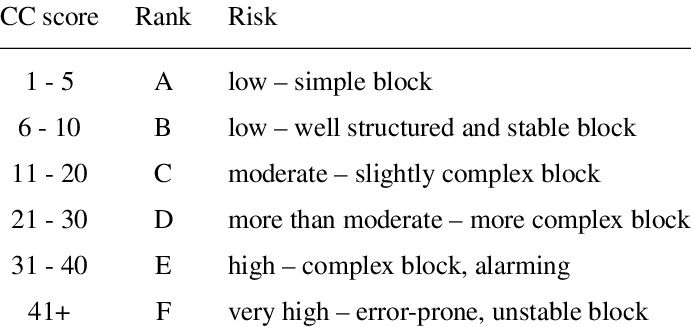
Using the formula: V(G)=E−N+2P= 27 (decision points) + 1 = 28 CC Score
Cyclomatic Complexity Range
Tools for Measuring Cyclomatic Complexity
- SonarQube: Offers detailed code quality reports, including complexity metrics and its an open source platform.
- JDepend: Ideal for Java applications to measure complexity and related metrics.
- PMD: A static analysis tool that evaluates complexity for languages like Java and JavaScript.
- https://learn.microsoft.com/en-us/visualstudio/code-quality/code-metrics-cyclomatic-complexity?view=vs-2022
Summary
- Cyclomatic complexity gives an estimate of the number of paths through the code and is used to understand the testability and complexity of a program.
- Code with higher cyclomatic complexity is harder to test, maintain, and understand. Generally, you want to aim for a lower cyclomatic complexity.
- Keep your functions small, use simple control structures, and break down complex logic into smaller, more manageable pieces to reduce Cyclomatic complexity.
Code Readability and Maintainability Measures
Although not mathematically precise, various measures can be used to calculate the complexity of code in regards to its form and readability:
Lines of Code (LOC): Not a measurement of time complexity or space complexity directly, yet potentially more code can make the program harder to understand and to maintain.
Halstead Complexity: This metric uses the number of distinct operators and operands in the code and applies them to derive a general measure of complexity. Halstead’s formulas are:
Vocabulary: Number of distinct operators and operands.
Length: The total number of operators and operands in the code.
These could provide a better picture of the complexity of a program than just its algorithmic execution.
Common Programming Principles
K.I.S.S(Keep It Simple, Stupid)
“That’s been one of my mantras — focus and simplicity. Simple can be harder than complex: You have to work hard to get your thinking clean to make it simple. But it’s worth it in the end because once you get there, you can move mountains”
Steve Jobs.
“Keep It Simple, Stupid (KISS)“ states that most systems work best if they are kept simple rather than making it complex, so when you are writing code your solution should not be complicated that takes a lot of time and effort to understand. K.I.S.S brings to mind and indestructible glass box, where all the processes can be clearly seen but is also very secure.
Code is not written for machines
Machines couldn’t care about our code. All the programs and scripts you write are for humans. You write it only once but read it possibly a thousand times for that reason code design objective thereby should be to offer the best user experience possible.
// Quake III Source Code..
// It finds the inverse square root of a number.

float InvSqrt (float x){
    float xhalf = 0.5f*x;
    int i = *(int*)&x;
    i = 0x5f3759df - (i>>1);
    x = *(float*)&i;
    x = x*(1.5f - xhalf*x*x);
    return x;
}
Simple doesn’t always mean short
Code should be simple — always.
If you’re
using complicated logic to solve something basic, take a step back. Chances are, it can be done more
cleanly.
Remember, your code might be read, used, or modified by another developer later on. What makes perfect sense to you now might look confusing to someone else — or even to you, six months from now.
That’s why simplicity isn’t optional — it’s essential. Write code that’s easy to read, easy to understand, and easy to change.
Short but less readable version:
bool isPalindrome(const string& s) {
    return s == string(s.rbegin(), s.rend());
}
- Compact and clever
- Might confuse beginners (especially
rbegin()/rend())
Simple and readable version:
bool isPalindrome(const string& s) {
    int left = 0;
    int right = s.length() - 1;

    while (left < right) {
        // Compare characters from both ends
        if (s[left] != s[right]) {
            return false;
        }
        left++;
        right--;
    }

    return true;
}
- Follows the logic step-by-step
- Easy to debug
- No STL tricks
- Reads like a story: “Check characters from both ends until they meet.”
How to apply the KISS principle?
To apply KISS to design and code, there hundreds of ways but, I want to provide you with some ideas;
- Readability , your code avoid any disambiguate.
- Maintainability , if your code can not maintenance easily reconsider refactoring option.
- Efficiency , If you want to build efficient application with fewer bugs to trouble you, using fewer code lines may be your best solution for getting more efficiency.
- Use Tools, If you can not code review anyone at least you can use Code Analysis Tools. For example SonarQube most popular one.
DRY
“Don’t Repeat Yourself (DRY)” is a software development principle that stands for “Don’t Repeat Yourself.” Living by this principle means that your aim is to reduce repetitive patterns and duplicate code and logic in favor of modular and referenceable code.
Before DRY :
public int Calculate(string operation, long a, long b)
{
    if (operation == "+")
    {
        return (int)(a + b);
    }

    if (operation == "-")
    {
        return (int)(a - b);
    }

    if (operation == "x")
    {
        return (int)(a * b);
    }

    if (operation == "/")
    {
        if (b == 0)
        {
            throw new DivideByZeroException("Cannot divide by zero.");
        }
        return (int)(a / b);
    }

    throw new InvalidOperationException($"Unsupported operation: '{operation}'");
}
After DRY :
public int Calculate(string operation, long a, long b)
{
    return operation switch
        {
            "+" => (int)(a + b),
            "-" => (int)(a - b),
            "x" => (int)(a * b),
            "/" when b != 0 => (int)(a / b),
            "/" => throw new DivideByZeroException("Cannot divide by zero."),
            _ => throw new InvalidOperationException($"Unsupported operation: '{operation}'")
        };
}
Advantages of DRY Principle
- The DRY (Don’t Repeat Yourself) principle is more than just a catchy phrase — it’s a core part of writing clean, maintainable code. Here’s why it matters:
✅ 1. Code Maintainability
When you avoid repetition, updates become easier. Fixing a bug or improving a feature in one place automatically reflects across the entire codebase. No hunting down duplicates.
🧪 2. Better Testing and Debugging Experience
Less duplicated logic means fewer places for bugs to hide. When something breaks, you have a smaller surface area to investigate. This makes testing and debugging way smoother.
🧼 3. A Good Start Toward Clean Code & Clean Architecture
Following DRY naturally leads to more modular, organized code. It encourages reusable functions, clear responsibilities, and a scalable structure — key principles of clean architecture.
YAGNI
“You aren’t gonna need it” (YAGNI) is a principle which arose from extreme programming (XP) that states a programmer
should not add functionality until deemed necessary.
Martin Fowler have awesome document to understand
Yagni concept also.
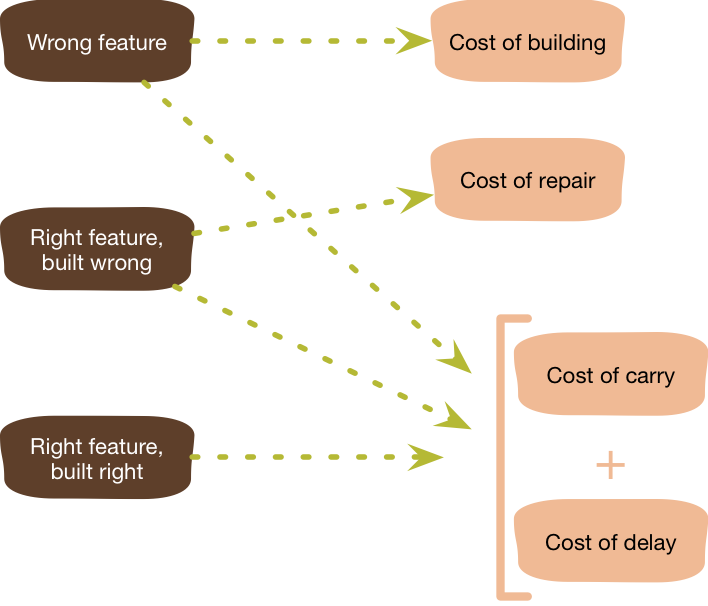
Here, we’re adding mod and pow
operations without ever needing them at the
moment. In many cases, these features might never even be used, so this overcomplication isn't
necessary. You can delete this lines.
public int Calculate(string operation, long a, long b)
{
    // Unnecessary complexity added for handling a future,
    // non-existent feature (modulo, exponentiation, etc.)
    if (operation == "mod")
    {
        return (int)(a % b);
    }

    if (operation == "pow")
    {
        return (int)Math.Pow(a, b);
    }

    // Other operations
    if (operation == "+")
    {
        return (int)(a + b);
    }

    if (operation == "-")
    {
        return (int)(a - b);
    }

    if (operation == "x")
    {
        return (int)(a * b);
    }

    if (operation == "/")
    {
        if (b == 0)
        {
            throw new DivideByZeroException("Cannot divide by zero.");
        }
        return (int)(a / b);
    }

    throw new InvalidOperationException($"Unsupported operation: '{operation}'");
}
SOLID
In software engineering, SOLID is a mnemonic acronym for five design principles intended to make object-oriented designs more understandable, flexible, and maintainable.
The SOLID ideas are
- The Single-responsibility principle(SRP): “There should never be more than one reason for a class to change.” In other words, every class should have only one responsibility. SRP principle give us such as Testing, Lower coupling and Organization(Smaller, well-organized classes) benefits.
- The Open–closed principle: “Software entities … should be open for extension, but closed for modification.”
- The Liskov substitution principle: “Functions that use pointers or references to base classes must be able to use objects of derived classes without knowing it.”
- The Interface segregation principle: “Clients should not be forced to depend upon interfaces that they do not use.”
- The Dependency inversion principle: “Depend upon abstractions, [not] concretions.”
Although the SOLID principles apply to any object-oriented design, they can also form a core philosophy for methodologies such as agile development or adaptive software development.
“Talk is cheap. Show me the code.”
- Linus Torvalds
Single-responsibility principle(SRP)
A class should take care of a Single
Responsibility.
SRP
Example 1:Bad and Better way
// source code from
// https://github.com/harrymt/SOLID-principles#single-responsibility-principle
class Customer_BadWay
{
    void Add(Database db)
    {
        try
        {
            db.Add();
        }
        catch (Exception ex)
        {
            File.WriteAllText(@"C:\Error.log", ex.ToString());
        }
    }
}

//This is not Best Solution ! Try to Show separate content and
//single responsibility of your code
class Customer_BetterWay
{
    private FileLogger logger = new FileLogger(@"C:\Error.log");
    void Add(Database db)
    {
        try {
            db.Add();
        }
        catch (Exception ex)
        {
            logger.Handle(ex.ToString());
        }
    }
}
class FileLogger
{
    void Handle(string logPath,string error)
    {
        try
        {
          if(!String.IsNullOrEmpty(error)){
            File.WriteAllText(logPath, error);
          }
        }catch{
          //handle the exception
        }
    }
}
SRP Example 2:Bad and Better way
//  BAD WAY
class Order{

  public OrderResult Process(OrderObject orderObj){
    ValidateRequest(orderObj);
    return Execute(orderObj);
  }

  private void ValidateRequest(OrderObject orderObj){
    ...
    if(!IsCustomerExist(orderObj.customerId)){
      throw new Exception("Customer Not Found");
    }
    ...
  }

  private void Execute(OrderObject orderObj){
    ...
    SendNotification(orderObj.customerID);
    ...
  }

  private bool IsCustomerExist(long customerId){
    //Lets assume that this method access directly
  }

  private void SendNotification(long customerId){
    //Lets assume that this method send notification directly
  }
}

//BETTER WAY

class Order {
  //Order class only Order bussiness logic
  public OrderResult Process(OrderObject orderObj){
    ValidateRequest(orderObj);
    return Execute(orderObj);
  }

  private void ValidateRequest(OrderObject orderObj){
    ...
    Customer customerObj=new Customer();

    //throw or bussiness logic inside the Customer Class
    var customerDetail=customer.GetCustomerById(orderObj.customerId);
    ...
  }

  private void Execute(OrderObject orderObj){
    ...
    Notification notificationObj=new Notification();
    notificationObj.Send(orderObj.customerID);
    ...
  }

}

class Customer {
// after this abstraction Order Class does not
// any Customer bussiness logic
}

class Notification {
// after this abstraction Order Class does not
// any Notification bussiness logic
}
Open–closed principle(OCP)
Classes should be open for extension but closed for modification. In doing so, we stop ourselves from modifying existing code and causing potential new bugs. OCP is a guideline for the overall design of classes and interfaces and how developers can build code that allows change over time
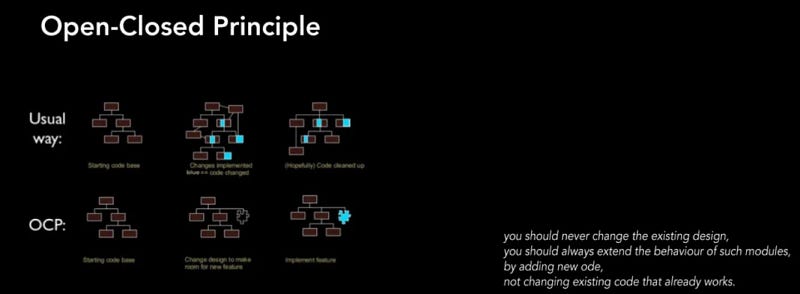
OCP Examples :
Bad Way
//Lets Assume That First version on our code only Rectangle class exist

public class Rectangle {
    public double Length {get;set;}
    public double Height {get;set;}
}
//AreaManager main issue calculate sum of the are given rectangle list
public class AreaManager{
    public double Calculate(List<Rectangle> shapeList){
      double sumOfArea=0;

     foreach(Rectangle item in shapeList){
      sumOfArea = sumOfArea+(item.Height+item.Length);
     }
    return sumOfArea;
    }
}
//After Bussiness requirement we added Triangle our domain
public class Triangle{
   public double Base{get;set;}
   public double Height {get;set;}
}
//new AreaManager is
public class AreaManager{
    public double Calculate(List<object> shapeList){
      double sumOfArea=0;

     foreach(var item in shapeList){
       if(item is Rectangle){
         sumOfArea = sumOfArea+(item.Height+item.Length);
       }
       if(item is Triangle){
         sumOfArea = sumOfArea+((item.Base+item.Length)*0.5);
       }
     }
    return sumOfArea;
    }
}
/*

OCP Concept as you can see AreaManager Class
need refactoring every new Shape Type.This mean
that our code is close for new development.

*/

public class Circle : IShape {
  public double Radius{get;set;}

  public double GetArea(){
      return Math.PI*(this.Radius*this.Radius);
   }
}
Better Way
public Interface IShape{
  public double GetArea();
}

public class Rectangle : IShape {
    public double Length {get;set;}
    public double Height {get;set;}
    public double GetArea(){
      return this.Length+this.Height;
    }
}
public class Triangle : IShape {
   public double Base{get;set;}
   public double Height {get;set;}
   public double GetArea(){
      return 0.5*(this.Base+this.Height);
   }
}
public class AreaManager{
    public double Calculate(List<IShape> shapeList){
      double sumOfArea=0;

     foreach(var item in shapeList){
         sumOfArea = sumOfArea+item.GetArea();
     }
    return sumOfArea;
    }
}
/*
For example we want to add Circle Area calculation
our domain.we just only need new Circle Class
derivative from Shape.AreaManager has no refactoring
need.
*/

public class Circle : IShape {
  public double Radius{get;set;}

  public double GetArea(){
      return Math.PI*(this.Radius*this.Radius);
   }
}
Liskov substitution principle (LSP)
Maybe one of the misunderstand SOLID principle.
“Functions that use pointers or references to base classes must be able to use objects of derived classes
without knowing it.”.
Uncle Bob, and others regard the LSP as a cornerstone of Design by Contract.
For example we have Electric and Gas power car solution. Electric powered car has no Refueling requirement. but the contract of the Car class states that an electric car can. This violates Liskov Substitution Principle since an electric car try to access. First code show without LSP usage.
public interface ICar
{
  public void Move( int meter );
  public void Refuel( double liter);
}

public class GasPoweredCar  : ICar {
  public void Move( int meter ){
    ...
  }
  public void Refuel( double liter){
    ...
  }
}
public class ElectricPoweredCar  : ICar {
  public void Move( int meter ){
    ...
  }
  public void Refuel( double liter){
     throw new Exception("Electrict car only chargeable.");
  }
}
public class CarManager {
   public void Go(List<ICar> carList){
     ...
     carList[i].Refuel(..); //Electrict throw Exception
     ...
   }
}
We can be solved by applying better domain naming and abstraction. Both Car model have Move(..) action but Refuel(..) is has relation this mean that we can remove and create another contract.
public interface ICar
{
  public void Move( int meter );
}

public interface IVehicle{
  public void Refuel( double liter);
}
public interface ICharger{
  public void ReCharge( double time);
}
public class GasPoweredCar  : ICar,IVehicle {
  public void Move( int meter ){
    ...
  }
  public void Refuel( double liter){
    ...
  }
}
public class ElectricPoweredCar  : ICar,ICharger {
  public void Move( int meter ){
    ...
  }
  public void ReCharge( double time){
    ...
  }
}
public class CarManager {
   public void Go(List<ICar> carList){
     ...
     carList[i].Refuel(..);// Only Gas Car access
     carList[i].ReCharge(..);//Only Electrict Car access
     ...
   }
}
Interface segregation principle (ISP)
In the field of software engineering, the interface segregation principle (ISP) states that no code should be forced to depend on methods it does not use.
ISP Example
We can start with an example that does not comply with the ISP principle. Let’s take the Animal interface and it contains features related to animals. Let’s imagine that there are features such as flying, running and barking.
public interface IAnimal {
   public void fly();
   public void run();
   public void bark();
}

// as you can see Bird can not barking but out
// inheritence reason we implement it.
public class Bird : IAnimal {
        public void bark() {
             /* do nothing */
        }
        public void run() {
            Console.WriteLine("Bird can run ");
        }
        public void fly() {
            Console.WriteLine("Bird can fly");
        }
}
// Some problem exist form Cat fly() and bark()
// function not using
public class Cat : IAnimal {
        public void fly() {
             /* do nothing */
        }
        public void run() {
            Console.WriteLine("Cat can run");
        }
        public void bark() {
             /* do nothing */
        }
}
// Some problem exist form Dog fly()
// function not using
public class Dog: IAnimal {
        public void fly() {
             /* do nothing */
        }
        public void run() {
            Console.WriteLine("Dog can run");
        }
        public void bark() {
             /* do nothing */
        }
}
As you can see Bird, Cat and Dog have some common properties but some of properties only owners have. Interface segregation principle we can separate fly, run and bark to new interfaces. Every Animal have own properties this solution.
public interface IFlyable {
    public void fly();
}
public interface IRunnable {
    public void run();
}
public interface IBarkable {
    public void bark();
}

public class Bird : IRunnable,IFlyable{
        public void run() {
            Console.WriteLine("Bird can run ");
        }
        public void fly() {
            Console.WriteLine("Bird can fly");
        }
}
public class Cat : IRunnable {
        public void run() {
            Console.WriteLine("Cat can run");
        }
}
public class Dog: IRunnable,IBarkable{
        public void run() {
            Console.WriteLine("Dog can run");
        }
        public void bark() {
            Console.WriteLine("Dog can bark");
        }
}
Dependency inversion principle (DIP)
“Depend upon abstractions, [not] concretions.” mean that When a behavior changes in higher-level classes, lower-level behaviors must adapt to this change. However, when a behavior changes in lower-level classes, there should not be a deterioration in the behavior of higher-level classes.
Dependency Inversion, that is, upper classes should not depend on lower-level classes, and the solution should be that both can be managed through abstract concepts. We can create an abstraction layer between high level and low level classes.
Bad Way
public class Email{
  public void SendEmail(){
   ...
  }
}
public class SMS{
  public void SendSMS(){
   ...
  }
}
public class Notification{
  public Send(){
    var emailNotification=new Email();
    var smsNotification=new SendSMS();
    ....
    emailNotification.SendEmail();
    emailNotification.SendSMS();
    ....
  }
}
Better Way ,After refactoring your code will be more loosely coupled and reusable for new Message types.
public interface IMessage{
  public void SendMessage();
}
public class Email : IMessage{
   public void SendMessage(){
     SendEmail();
   }
   private void SendEmail(){
   ...
   }
}
public class SMS : IMessage{
   public void SendMessage(){
     SendSMS();
   }
   private void SendSMS(){
   ...
   }
}
public class Notification{
  public Send(List<IMessage> notificationList){
    foreach(var selectedNotification in notificationList){
      selectedNotification.SendMessage();
    }
  }
}
Separation of Concerns (SoC)
Separation of Concerns (SoC) is a design principle that manages complexity by partitioning the software system so that each partition is responsible for a separate concern, minimizing the overlap of concerns as much as possible.
SoC in general; It allows us to develop every new module or existing module we develop in our application without disrupting or affecting other structures. It allows us to produce products more easily by keeping the coupling we always hear about, that is, commitment, to a minimum. So, with a perfectly implemented SoC, we can focus only on what you are developing.
For example MVC is one of the best suit example for Separation of Concerns (SoC). Model ,View and Controller are handled at different points comes from this principle. Of course, we cannot save real-life projects in such a simple way. At that point, we need to act with the most basic aspect of this principle, that is, divide it into the smallest piece you can.
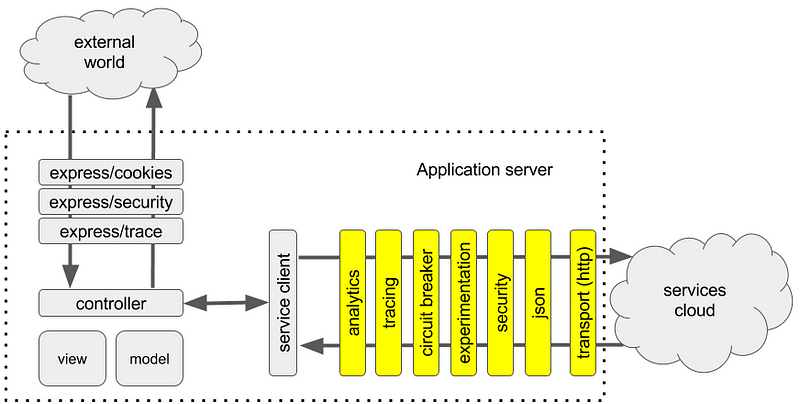
Law of Demeter
The Law of Demeter (LoD) or principle of least knowledge is a design guideline for developing software, particularly object-oriented programs. In its general form, the LoD is a specific case of loose coupling. The guideline was proposed by Ian Holland at Northeastern University towards the end of 1987, and the following three recommendations serve as a succinct summary:
- Each unit should have only limited knowledge about other units: only units “closely” related to the current unit.
- Each unit should only talk to its friends; don’t talk to strangers.
- Only talk to your immediate friends.
LoD tells us that it is a bad idea for single functions to know the entire navigation structure of the system.
- Before of Law of Demeter Usage
public class User{
  Account account;
  public double Discount(string discountCode){
    Coupon coupon=new Coupon(discountCode);
    return coupon.Discount(account.GetOffer().GetPrice());
  }
}

public class Account{
 Offer offer;
 ...
}
After Law Of Demeter usage. Calculation of Discount does not to need know Coupon or Other Business Logic. After delegate Account system we can modify our business logic inside the Account domain.
public class User{
  Account account;
  public double Discount(string discountCode){
    //delegete Account
    return account.Discount(discountCode);
  }
}

public class Account{
 Offer offer;
 ...
  public double Discount(string disCountCode){
    Coupon coupon=new Coupon(disCountCode);
    return coupon.Discount(offer.GetPrice());
  }
}
* Advantages
The advantage of following the Law of Demeter is that the resulting software tends to be more maintainable and adaptable. Since objects are less dependent on the internal structure of other objects, object implementation can be changed without reworking their callers.
* Disadvantages
Although the Law of Demeter increases the adaptiveness of a software system, it may result in having to write many wrapper methods to propagate calls to components; in some cases, this can add noticeable time and space overhead.
Design Patterns
Design patterns are typical solutions to common problems in software design. Each pattern is like a blueprint that you can customize to solve a particular design problem in your code. You can find huge archive about it.
In addition, all patterns can be categorized by their intent, or purpose. Three main groups of patterns:
- Creational patterns provide object creation mechanisms that increase flexibility and reuse of existing code.
- Structural patterns explain how to assemble objects and classes into larger structures, while keeping these structures flexible and efficient.
- Behavioral patterns take care of effective communication and the assignment of responsibilities between objects.
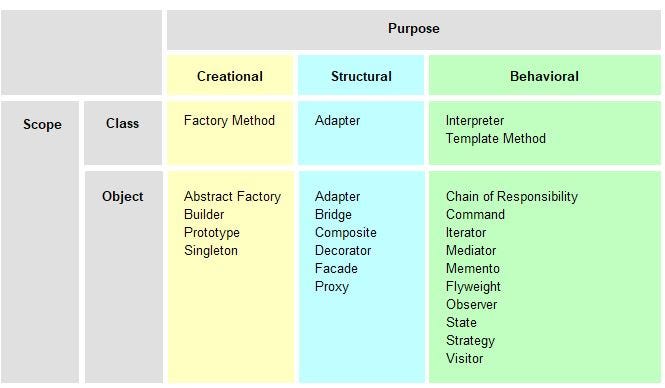
This is huge concept so that reason you should read and implement real life scenarios.
Resource
Anti-pattern
An anti-pattern in software engineering, project management, and business processes is a common response to a recurring problem that is usually ineffective and risks being highly counterproductive.
According to the authors of Design Patterns, there are two key elements to an anti-pattern that distinguish it from a bad habit, bad practice, or bad idea:
- The anti-pattern is a commonly-used process, structure or pattern of action that, despite initially appearing to be an appropriate and effective response to a problem, has more bad consequences than good ones.
- Another solution exists to the problem the anti-pattern is attempting to address.
A guide to what is commonly used is a “rule-of-three” similar to that for patterns: to be an anti-pattern it must have been witnessed occurring at least three times.
There are examples of Anti-Patterns that are given very frequently and are known. Spaghetti Code, Copy-Paste Programming, God Object (also known as BLOB Anti-Pattern), etc. With the expansion of the software world, the increase in cross-platform communication and the spread of Enterprise solutions, the issue of Anti-Pattern has become even more important. There are countless Anti-Patterns and they are classified into main and various subcategories.
1-) Development Anti-Patterns
The Blob (God Class) — A class that controls too much
of the application, leading to complexity and non-modularity.
Cut and Paste Programming — Copying and pasting code in different regions of the program instead of creating reusable functions or modules.
Functional Decomposition — Breaking a program into numerous functions, primarily leading to non-cohesion.
Golden Hammer — Using the same fix repeatedly to every issue, simply because you can.
Lava Flow — Keeping legacy code in the system, no one fully understands or uses, yet is too dangerous to remove.
Poltergeists — Classes or objects that don’t contribute meaningfully to the functionality and are essentially “invisible” with regards to their value.
Spaghetti Code — Code with a confused, unstructured design, difficult to add to and modify.
Reinventing the Wheel — Rebuilding functionality or components that already exist instead of reusing proven solutions.
Yo-yo Problem — Excessive context switching among different parts of code due to too complex dependencies.
Accidental Complexity — Adding unnecessary complexity to a system with no clear payoff.
2-) Development Mini Anti-Patterns
Ambiguous View — Lack of vision or vision of the
project direction or requirements.
Boat Anchor — Keeping a lot of unnecessary or old code, libraries, or dependencies that are no longer required but hard to get rid of.
Continuous Obsolescence — Inherently developing on top of old or outdated technologies.
Dead End — Developing components or features that are built in a way that limits future expansion or enhancement.
Input Kludge — Ineffective input validation and normalization, leading to errors and inefficiency.
Mushroom Management — Concealing from team members and telling them only when they cannot do otherwise.
3-) Architecture Anti-Patterns
Architecture by Implication — Architecting systems by
solving issues one at a time, but without any overall or coherent architecture.
Design By Committee — System architecture or design that fails because many people get involved without clear ownership or control.
Reinvent the Wheel — (Recreated from creation) — Creating new solutions to already solved issues.
Stovepipe Enterprise — Independent systems or departments that fail to communicate or share resources, and therefore lead to inefficiencies.
Stovepipe System — An independent system from other systems or applications, sometimes leading to redundant functionality.
Vendor Lock-In — Being locked into a specific vendor or technology, such that it is difficult to move to alternatives.
4-) Architecture Mini Anti-Patterns
Auto Generated Stovepipe — Automatically generated code
or systems that lead to siloed, difficult-to-maintain pieces.
Cover Your Assets — Overemphasis on protecting current work and assets over innovating or improving the system.
The Grand Old Duke of York — A situation where things are started and then abandoned without any apparent direction or end.
Intellectual Violence — Forced solutions which disregard technical know-how or facts, often leading to too reductionist or inapplicable solutions.
Jumble — An architecture where things or systems are badly integrated or not matching.
Swiss Army Knife — Attempting to solve many problems with one solution, tending to result in an overly complicated system.
Wolf Ticket — Promising or committing to deliver something that cannot realistically be achieved, usually for political or marketing purposes.
5-) Management Anti-Patterns
Analysis Paralysis — Analyzing a situation too much so
that no decisions or actions are taken.
Corncob — Ineffective decision-making or inconsistency in handling priorities.
Death By Planning — Over-planning that delays action or causes bottlenecks in project progress.
Irrational Management — Emotion, gut, or politics-driven decisions rather than data or reason.
Project Mis-Management — Poor management of project timelines, scope, resources, and risks, usually leading to project failure.
6-) Management Mini Anti-Patterns
Blowhard Jamboree — Managers who talk over everyone
without action or progress.
Email is Toxic — Overreliance on email for communication that can lead to confusion and inefficiency.
Fear of Success — Subconscious undermining of successful projects due to fear of change, responsibility, or backlash.
The Feud — Internecine warfare between members of the same department or team that takes away from productivity.
Smoke and Mirrors — Using deceptive or cunning devices in order to hide problems or deflect attention from real issues.
Throw it Over The Wall — Pushing difficulties or issues onto other groups without proper collaboration or communication.
Viewgraph Engineering — Using presentations and drawings as a substitute for actual working solutions or in-depth engineering.
Warm Bodies — Hiring people with no particular roles or duties, simply to fill chairs without regard to their actual contributions.
Mastering the Coding Mindset: Growth, Focus, Balance
Being a great developer is not all about learning to code languages or frameworks — it’s learning to get the right mindset. Having a balanced mindset allows you to grow, stay focused, and avoid burnout. In this section, we will discuss three critical areas that are paramount for every programmer: Growth Mindset, Focus, and Work-Life Balance.
Growth Mindset in Coding
Growth mindset is the
belief that one’s intelligence and abilities can be developed through effort, learning, and persistence.
In coding, a growth mindset can lead to continuous improvement and perseverance when facing challenges.
Taking Failure as an Opportunity to Learn
Failure is
not a dead end; it’s unavoidable, but a part of learning. Each bug or error that you must work your way
through is a chance to learn and grow. Rather than getting frustrated with mistakes, use them as
opportunities to be a better developer.
Example: When you can’t fix a bug, treat it as an opportunity to learn more about debugging techniques or discover more about how your code interacts with third-party libraries or APIs.
The Importance of Continuous Practice
Coding is a
skill, and like all other skills, the more regularly it is practiced, the better it becomes. Coders who
spend every day coding, even if only for an hour, tend to develop exponential improvement in the long
term.
Example: Take a time suspension daily for coding practice, whether on side projects, problem-solving websites like LeetCode, or learning about new paradigms in coding.
The Role of Mentorship and Community in
Growth
Mentorship will advance your growth by providing you with guidance, criticism, and
new perspectives. Coding community interaction will also acclimatize you to different styles of coding and
methods of problem-solving.
Example: Join coding forums or communities (e.g., GitHub, Stack Overflow) and locate mentors who can give constructive criticism of your code. Pair programming with AI tools.
The Science of Focus in Programming
Developers
require focus as a skill. With all the distraction caused by emails, social media, and constant
notifications, staying focused is difficult. Practice focus, however, leads to higher quality work, better
problem-solving, and higher productivity.
Time Management Techniques for Developers
Pomodoro Technique: This method is an intense period of
work (typically 25 minutes) with a 5-minute break. After four cycles, take a 15- to 30-minute break. It
maintains high concentration levels and avoids mental exhaustion.
Time-Blocking: Block out certain periods in your day for concentrated work. You could dedicate morning periods to coding and afternoon periods to meetings or administration. This ensures you’re devoting time to what counts.
Example: Use a timer to implement Pomodoro or time-block your day by your most productive time.
Creating a Distraction-Free Coding
Environment
Minimize distractions in both your physical and digital space. Use apps such as
“Focus Mode” or “Do Not Disturb” to turn off notifications. Clear your workspace of clutter and only have
what is needed.
For example: Have a minimalist setup: one screen with no windows open except what is needed, noise-cancelling headphones, and a tidy desk that reduces distractions.
Techniques for Maintaining Deep Work
Deep work is
the capacity to concentrate without distraction on a cognitively challenging task. Develop this ability by
removing multitasking and committing large blocks of time to complicated coding work.
Example: Experiment with disabling social media notifications and employing a tool such as “Forest” to maintain concentration. Strive to surround yourself with the issue without context-switching every few minutes.
Work-Life Balance for Developers
The technology
world can be tough, with long hours and strict deadlines. It is necessary to maintain a healthy work-life
balance in order not to get burned out and keep your passion for coding alive.
Preventing Burnout in the Technology World
Burnout
occurs when stress and workload accumulate over time with inadequate recovery. Prevent burnout by setting
boundaries, taking breaks, and understanding when you must rest.
Example: If you feel mentally exhausted, go for a walk, meditate, or step away from the computer. Learn to say no when you have too much work.
The Need for Breaks and Hobbies Beyond Coding
Taking
frequent breaks and doing something other than coding can refresh you and bring new ideas to your coding
work. Activities such as exercise, reading, or even socializing with friends can lower stress levels and
improve productivity when you get back to coding.
Example: Plan a weekly activity that you like, e.g., hiking, playing a sport, or learning a non-tech skill like painting or music.
Handling Expectations and Stress in High-Demand Coding
Areas
Under high-pressure, time-sensitive environments, there’s always a tendency to feel
swamped. To handle expectations is to create achievable goals, communicate effectively, and schedule tasks
according to urgency.
Example: Break enormous projects into minute tasks, and address each task separately. Be open with peers or clients if timelines need to be adjusted to provide quality output.
Learn from Master-Best Channels
Here’s a list of channels I follow and highly recommend. Feel free to share your favorites in the comments as well!
1-) George Francis Hotz, alias geohot, is an American security hacker, entrepreneur and software engineer.
youtube.com/georgehotzarchive is an unofficial comma.ai and George Hotz video archive. Previously it was named commaai…www.youtube.com
2-) tscoding ,Channel Link : tscoding
3-) Traversy Media , Brad Traversy’s channel is a goldmine for web developers. From full-stack tutorials to front-end frameworks, you’ll find tons of resources on modern technologies.
Channel link: Traversy Media
4-) The Coding Train, Daniel Shiffman brings coding to life with his fun, engaging tutorials, especially for creative coding, data visualization, and generative art. His energy makes learning programming feel exciting.
Channel link: The Coding Train
5–) Fireship , Fireship offers short, high-quality tutorials on modern web development, cloud computing, and various frameworks. His 100-second tech tutorials are a great way to grasp complex concepts in a concise format.
Channel link: Fireship
End Thoughts
First of all, thank you for reading this far! I truly hope this article gave you something valuable to take away.
Software development is, in a way, simple — and yet the hardest part is keeping it that way. As your software grows, maintaining clean, efficient, and understandable code becomes more challenging. It’s like trying to fix a moving car while the engine’s still running.
But that’s where the craft lives.
Keep practicing. Keep reading code. Keep writing it. Progress doesn’t happen all at once — practice makes perfect. And whatever you do, never stop learning.
Making a conclusion
👨👦👦 Leave a comment, I am free for discussion with your any kind technical question.
Tags
#CleanCode #SoftwareEngineering #CodeQuality #ProgrammingMindset #SOLIDPrinciples #DeveloperLife #DevTips #100DaysOfCode #Refactoring #DesignPatterns #SoftwareCraftsmanship #CodingPrinciples #CodeNewbie #TechTwitter #DRY #YAGNI #FocusAndFlow #WorkLifeBalance