
Modernizing PHP Applications with Golang- Roadrunner.dev
Modernizing PHP Applications with Golang- Roadrunner.dev
Another crazy idea of execution the PHP code from Golang web server. I am not kidding.
Why did I decide to switch my application from PHP-FPM to RoadRunner before even starting the RoadRunner integration?
The short answer: PHP-FPM was too slow under high traffic, and each incoming request spawned a new process with significant memory usage — making it easy to hit RAM limits.
You might be surprised how much memory a single PHP worker can consume, especially in a real-world project. When requests pile up, this quickly becomes a bottleneck.
I have a VPS server with 2 CPUs and 8 GB of RAM. Out of the 8 GB, about 3 GB is allocated for the operating system, MariaDB, and the Manticore application. This leaves around 5 GB for PHP and Nginx.
Each PHP worker process is allocated 256 MB of RAM, which is important for handling PHP execution in the E-commerce application built on the Slim 3 PHP framework. Every request nearly hit the cache. Twig is using for frontend with cache setting. My setting and performance test below before install roadrunner. This values production environment.
php fpm pool setting

pm = dynamic
pm.max_children = 20
pm.start_servers = 5
pm.min_spare_servers = 5
pm.max_spare_servers = 10
pm.process_idle_timeout = 10s
pm.max_requests = 300
user:/var/www/myapp # wrk -t4 -c100 -d60s https://www.myapp.com/
Running 1m test @ https://www.myapp.com/
  4 threads and 100 connections
  Thread Stats   Avg      Stdev     Max   +/- Stdev
    Latency     1.61s   299.64ms   1.93s    77.78%
    Req/Sec     6.18      5.04    40.00     79.50%
  890 requests in 1.00m, 773.22MB read
  Socket errors: connect 0, read 0, write 0, timeout 0
Requests/sec:     14.82
Transfer/sec:     12.88MB

The homepage request is served by reading data directly from RAM,
with the content stored in JSON format on disk. On each request,
the application hits the disk cache and processes the response
using Slim 3 and Twig.

Additionally, the page includes third-party scripts such as
Google AdSense, Google Analytics, and Cloudflare JavaScript.
Step 0 — Refactoring existing Code
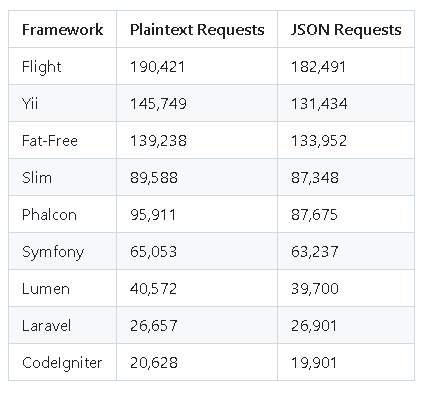
First at all I was refactored existing code. Slim3 Framework is lightweight framework but still using too much memory. I was looked alternatives 2 option suitable for me FatFree and flightphp . I was choosed fastest and more tiny framework flightphp.
Performance comparison of a wide spectrum of web application frameworks and platforms using community-contributed test…www.techempower.com
In my case, I was able to easily refactor
the application to use FlightPHP. I also
optimized memory usage by refactoring unused arrays and variables, using unset() to help PHP's garbage collection work more
efficiently. As a result, each request now uses between 6-8 MB of memory. Below are the results from the
wrk test:
vps:/var/www/myapp # wrk -t4 -c100 -d60s https://www.myapp.com/
Running 1m test @ https://www.myapp.com/
  4 threads and 100 connections
  Thread Stats   Avg      Stdev     Max   +/- Stdev
    Latency     1.38s   401.67ms   2.00s    64.42%
    Req/Sec     9.58      6.62    40.00     75.87%
  1695 requests in 1.00m, 771.92MB read
  Socket errors: connect 0, read 0, write 0, timeout 0
Requests/sec:     28.23
Transfer/sec:     12.86MB
I was able to increase the request throughput by nearly 100%, but the performance still seems slow. Upon further investigation, I found that PHP-FPM was using memory inefficiently. Since all my requests involve simple disk or RAM cache read operations, the execution of these requests isn’t blocking. Given this, I started exploring alternatives to PHP-FPM that could execute PHP in a more efficient manner with lightweight worker threads.
Step 2-PHP-FPM to Roadrunner migrate
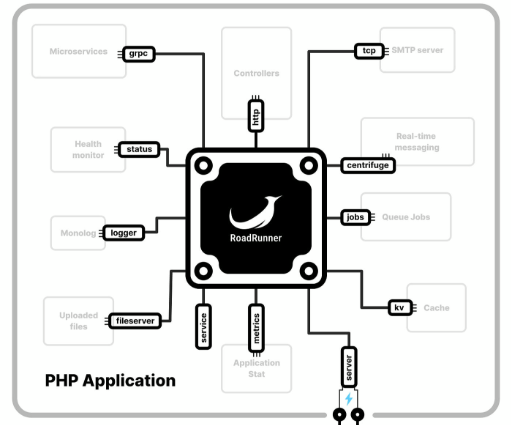
RoadRunner is a high-performance PHP application server and process manager, designed with extensibility in mind through its utilization of plugins. Developed in Go, RoadRunner operates by running your application in the form of workers, where each worker represents an individual process, ensuring isolation and independence in their operation.
It is designed to be like a central processor
for PHP applications, helping developers create faster, more responsive and robust applications with
ease.
If you want to look roadrunner alternative you can look at these solution too.
- Swoole is a high-performance coroutine-based PHP extension that provides a variety of features like HTTP servers, WebSocket support, and task scheduling.
- ReactPHP is an event-driven, non-blocking I/O library for PHP. It is designed to handle asynchronous operations and can be used to build high-performance servers.
- PHP-PM(PHP Process Manager) is a fast process manager that runs PHP applications in a high-performance multi-threaded environment, specifically tailored for frameworks like Symfony or Laravel.
- Amp is an event-loop framework for PHP that supports async programming. It allows you to write asynchronous code in PHP using generators and coroutines.
I have Disk I/O usage too much for that reason I want to prefer Roadrunner otherwise I want to prefer Swoole.
Roadrunner vs Swoole ?
* Installation
You can install your Operating System given
document.
https://docs.roadrunner.dev/docs/general/install
I’m assuming you’ve already installed the
RoadRunner binary in your development environment. In my case, I’m working on a Debian system. RoadRunner
is installed at /usr/local/bin/rr.
To confirm it’s working correctly, just run:
rr -v

#Sample Response

rr version 2024.3.5 (build time: 2025-02-27T17:24:29+0000, go1.24.0),
OS: linux,arch: amd64
* Adding Roadrunner Worker and rr.yaml
Roadrunner need worker.php , rr.yaml(you can change it) and worker.php needs 3 repo for execution.
- Worker.php which process message
- rr.yaml : Roadrunner setting file
- composer require “spiral/roadrunner” “spiral/roadrunner-http” “nyholm/psr7”
Lets me show my index.php skeleton before roadrunner install.
<?php

require __DIR__ . '/vendor/autoload.php';

use App\Controller\ApplicationController;

$loader = new \Twig\Loader\FilesystemLoader(__DIR__ . '/html/');

$twig = new \Twig\Environment($loader, [
     'cache' => __DIR__. '/caches/twig/',
]);

Flight::route('HEAD /', function () {
    echo "Welcome www.myapp.com";
});

Flight::route('GET /', function () use ($twig) {
    ApplicationController::handleHomePage(__DIR__, $twig);
});

/*
Other route list etc
*/

Flight::start();
After migrate Roadrunner we are comment out ”Flight::start();” line ! And add worker.php because only one Flight::Start() need.
composer.json view
        "spiral/roadrunner": "^2024.3",
        "spiral/roadrunner-http": "^3.5",
        "nyholm/psr7": "^1.8"
worker.php
<?php

use Spiral\RoadRunner\Http\PSR7Worker;
use Spiral\RoadRunner\Worker;
use Nyholm\Psr7\Factory\Psr17Factory;

require '/var/www/myapp/vendor/autoload.php';

// Initialize RoadRunner Worker
$worker = Worker::create();
$psr17Factory = new Psr17Factory();
$httpWorker = new PSR7Worker($worker, $psr17Factory, $psr17Factory, $psr17Factory);

// Load FlightPHP app **WITHOUT** calling Flight::start()
require '/var/www/myapp/index.php';

while ($request = $httpWorker->waitRequest()) {
    try {
        ob_start();

        // Manually simulate a request inside FlightPHP
        $_SERVER['REQUEST_METHOD'] = $request->getMethod();
        $_SERVER['REQUEST_URI'] = $request->getUri()->getPath();
        $_SERVER['QUERY_STRING'] = $request->getUri()->getQuery();
        $_SERVER['HTTP_HOST'] = $request->getUri()->getHost();  // FIX: manually set HTTP_HOST
        $_SERVER['SERVER_PORT'] = $request->getUri()->getPort() ?? 80;
        $_SERVER['HTTPS'] = $request->getUri()->getScheme() === 'https' ? 'on' : 'off';

        // Set query parameters
        $_GET = $request->getQueryParams();
        $_POST = json_decode($request->getBody()->getContents(), true) ?? [];

        // Start FlightPHP, but **only once per request**
        Flight::start();

        $responseBody = ob_get_clean();

        // Create HTTP response
        $response = $psr17Factory->createResponse(200)
            ->withBody($psr17Factory->createStream($responseBody))
            ->withHeader('Content-Type', 'text/html');

        $httpWorker->respond($response);
    } catch (\Throwable $e) {
        ob_end_clean(); // Discard any partial output

        // Log the error
        error_log('Worker Error: ' . $e->getMessage());
        $worker->error($e->getMessage());

        // Splash page HTML with error code and message
        $errorCode = $e->getCode() ?: 500;
        $errorHtml = <<<HTML
        <!DOCTYPE html>
        <html lang="en">
        <head>
            <meta charset="UTF-8">
            <title>Error $errorCode</title>
            <style>
                body { font-family: Arial, sans-serif; text-align: center; padding: 50px; background: #f8d7da; }
                h1 { color: #721c24; }
                p { color: #721c24; }
            </style>
        </head>
        <body>
            <h1>Error $errorCode</h1>
            <p>Oops! Something went wrong. Please try again later.</p>
            <p>Details: {$e->getMessage()}</p>
        </body>
        </html>
        HTML;

        // Send error response
        $response = $psr17Factory->createResponse($errorCode >= 100 && $errorCode <= 599 ? $errorCode : 500)
            ->withBody($psr17Factory->createStream($errorHtml))
            ->withHeader('Content-Type', 'text/html');

        $httpWorker->respond($response);
    }
}
rr.yaml-you can change it your use case like dev-rr.yaml,prod-rr.yaml etc
version: "3"

server:
  command: "php /var/www/myapp/worker.php"

http:
  address: 127.0.0.1:8080
  workers:
    pool:
      num_workers: 15    # Adjusted based on available memory
      max_jobs: 100     # Avoid excessive memory usage per worker
      allocate_timeout: 10s
      destroy_timeout: 5s
      max_memory: 256   # Max MB per worker before restart
      supervisor:
        exec_ttl: 60s  # Worker max lifetime
        watch_tick: 1s  # Monitor workers every 1s

logs:
  mode: production   # or "development"
  level: info        # debug, info, warning, error
  output: stderr     # stderr or a file path like /var/log/rr.log
# Execute the roadrunner

root@desktop:/var/www/myapp# /usr/local/bin/rr serve -c /var/www/myapp/rr.yaml
[INFO] RoadRunner server started; version: 2024.3.5, buildtime: 2025-02-27T17:24:29+0000
[INFO] sdnotify: not notified
{"level":"info","ts":1744092698661634543,"logger":"http","msg":"http log","status":200,"method":"GET","URI":"/","URL":"/","remote_address":"127.0.0.1:53014","read_bytes":0,"write_bytes":459820,"start":1744092698457319976,"elapsed":203}
if you execute http://127.0.0.1:8080 you can access log from console. After all of them success we can add a roadrunner service.
* Create Roadrunner Service
After that the successfully executed roadrunner we can add a service to handle start , stop , status action.
#Create /etc/system.d/your_service_name.service
                                                                                 /etc/systemd/system/roadrunner.service
[Unit]
Description=RoadRunner PHP Worker-myapp
After=network.target

[Service]
ExecStart=/usr/local/bin/rr serve -c /var/www/myapp/rr.yaml
Restart=always
User=www-data
Group=www-data
WorkingDirectory=/var/www/myapp
StandardOutput=journal
StandardError=journal
Type=simple

[Install]
WantedBy=multi-user.target
sudo systemctl daemon-reexec
sudo systemctl daemon-reload
sudo systemctl enable your_service_name
sudo systemctl start your_service_name
after start you must check the systemctl status your_service_name is processing without error and no fail.
You can use roadrunner PHP and static file execution but I was prefer static file execution to Nginx. http://127.0.0.1:8080 for PHP execution. In this usage you can think PHP-FPM style usage.
My Nginx setup. This is my development environment setting !
server {
    listen 80 default_server;
    listen [::]:80 default_server;

    root /var/www/myapp;

    # Serve static files directly (CSS, JS, images, etc.)
    location /assets/ {
        root /var/www/myapp/;  # Ensure this path contains your assets
        expires max;
        access_log off;
        add_header Cache-Control "public, max-age=31536000, immutable";
        try_files $uri /index.html;  # Serve index.html if file is missing (optional)
    }

    # Serve common static file types
    location ~* \.(jpg|jpeg|png|gif|ico|css|js|woff2|woff|ttf|svg|mp4|webp)$ {
        root /var/www/myapp;
        expires max;
        access_log off;
        add_header Cache-Control "public, max-age=31536000, immutable";
    }

    # Apply rate limiting
    location / {
        proxy_pass http://127.0.0.1:8080;
        proxy_http_version 1.1;
        proxy_set_header Connection "";
        proxy_buffering off;
        proxy_read_timeout 60s;
        proxy_send_timeout 60s;
    }

    # Block access to hidden files like .htaccess
    location ~ /\. {
        deny all;
    }
}
after that restart nginx and roadrunner service
sudo systemctl start your_service_name
sudo systemctl start nginx
Final Result
root@desktop:/var/www/myapp# wrk -t4 -c100 -d60s http://127.0.0.1/
Running 1m test @ http://127.0.0.1/
  4 threads and 100 connections
  Thread Stats   Avg      Stdev     Max   +/- Stdev
    Latency   320.66ms   76.11ms 601.51ms   70.54%
    Req/Sec    78.06     26.48   180.00     68.53%
  18662 requests in 1.00m, 8.01GB read
Requests/sec:    310.61
Transfer/sec:    136.53MB
After migrating from PHP-FPM to RoadRunner, I’ve observed a noticeable decrease in average latency, which indicates that each request is being processed faster. Additionally, the number of requests per second has increased, meaning the system can now handle more traffic efficiently.
At the moment, I’m still testing RoadRunner in my development environment. Once I complete the transition to production, I’ll share real-world performance results.
What I really appreciate about RoadRunner is how easy the migration process has been, with zero additional development cost. Plus, having the flexibility to fall back to PHP-FPM in case of any issues provides an extra layer of safety.
Also some of the advance feature I didn't use such as KV,Grpc,Jobs etc.
Making a conclusion
👨👦👦 Leave a comment, I am free for discussion with your any kind technical question.
#RoadRunner #PHP #Golang #PerformanceOptimization #WebDevelopment #ApplicationServer #SlimFramework #PHPFPM #TechIntegration #SoftwareEngineering