
Fifteen Factor App : Best Practices
Fifteen Factor App : Best Practices
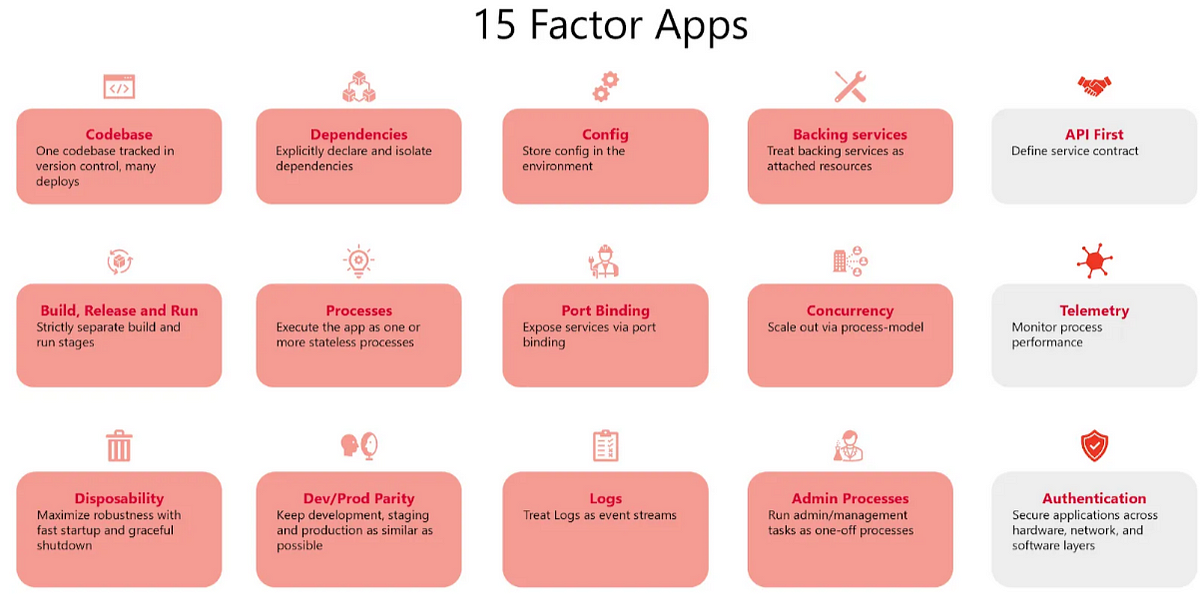
“The Twelve-factor app methodology is a set of recommendations for building portable, scalable, and reliable SaaS applications. With the approach, businesses are able to develop apps that have a decent user experience using virtual environments for higher availability. Three new Factors added this list API First, Telemetry, Authentication and Authorization .”
Before reading this document, I would
like to give general information regarding The Twelve-Factor App detail.
Twelve-Factor app suggests some very-tested software-as-a-service
(SaaS) app best practices and architecture patterns. Applications are developed with resilience as well as
portability with the assistance of these best practices while they are executed on the web.
It was
created by Heroku developers at some point in 2011. It was widely supported by Adam Wiggins, one of the
founders of Heroku. These principles remain widely popular and guide design and deployment of scalable and
manageable software systems.
It came out after years with some additional feature added like API First, Telemetry, Authentication and Authorization.
Summary
Here is a list of 15 Factors which help to make the modern cloud-native applications highly scalable, resilient and portable:
- Codebase — one codebase tracked in version control, many deploys
- Dependencies — Explicitly declare and isolate dependencies
- Config — store config in environment
- Backing services — treat backing service as an attached resource
- Build, release and run — strictly separate build and run phases
- Processes — execute app as one or more stateless processes
- Port binding — expose services via port binding
- Concurrency — scale-out via process model
- Disposability — maximize robustness with fast startup and graceful shutdown
- Dev/Prod parity — keep development, staging and production as similar as possible
- Logs — treat logs as stream of events
- Admin processes — Run admin/management tasks as one-off process
- API first — define service contract
- Telemetry — monitor process performance
- Authentication — secure applications across hardware, network and software layers
1-) Codebase
“One codebase tracked in revision control, many deploys”
The Twelve-Factor App methodology dictates that an application should have one codebase for an application housed in a version control system (e.g., Git, Mercurial). This one codebase is then utilized across different environments like development, testing, staging, and production.
Key Principles of Codebase Management
1. Version Control is Mandatory
- Use Git, Mercurial, or another version control system for tracking changes.
- Avoid managing code manually (e.g., zip files, FTP uploads).
- Use branches for feature development, bug fixes, and releases.
2. Single Codebase, Multiple Deployments
- There is only one repository for the application.
- Multiple environments (e.g., dev, test, staging, production) should use different deploys of the same codebase.
- Each environment should not have a separate fork of the codebase.
- Dependencies should be managed via package managers (e.g.,
npm,pip,composer) instead of committing them to the repo. - Use
package.json(Node.js),requirements.txt(Python), orcomposer.json(PHP) to define dependencies. - Automate builds and deployments using CI/CD.
❌ Incorrect Approach:
- Separate repositories for different environments:
git@github.com:mycompany/myapp-dev.git
git@github.com:mycompany/myapp-staging.git
git@github.com:mycompany/myapp-prod.git
✅ Correct Approach:
git@github.com:mycompany/myapp.git  (single repository)
 ├── deploy-dev (branch or environment variable for development)
 ├── deploy-staging
 ├── deploy-production
3. Every App Has Its Own Codebase
Separate your application architectural level. Each repo can deployable. A monolithic repository (monorepo) can be used for multiple services, but each service should be independently deployable.
❌ Incorrect Approach:
myapp (single repo)
 -> myapp-api (api project subdirectory)
 -> myapp-cdn (cdn project subdirectory)
 -> myapp-frontend (frontend project subdirectory)
✅ Correct Approach:
Repositories

myapp-api (api repo)
myapp-cdn (cdn repo)
myapp-frontend (frontend repo)
Summary
✅ One codebase per application, tracked in version
control.
✅ Use branches, CI/CD, and environment-based
deploys instead of separate repos.
✅ Dependencies should be declared (not committed).
✅ Keep sensitive configurations out of the codebase (use
environment variables).
✅ Automate builds and deployments using CI/CD.
2.Dependencies
“Explicitly declare and isolate dependencies using a package manager (e.g.,composer.jsonfor PHP,package.jsonfor Node.js) ”
In the Twelve-Factor App methodology, the application must not rely on system-level dependencies but instead declare and manage them explicitly using a package manager. This renders the application portable, predictable, and easy to deploy across different environments.
1. Explicitly Declare Dependencies
✅ Correct Approach:
- Node.js (npm or Yarn):
package.json→ Install withnpm installoryarn install. - PHP (Composer):
composer.json→ Install withcomposer install. - Python (pip):
requirements.txt→ Install withpip install -r requirements.txt. - Golang (Go Modules):
go.mod→ Install withgo mod tidy. - Ruby (Bundler & Gems) : Install
bundle install - Rust(Cargo) : Install
cargo build - Bower (JS, CSS, HTML)
- CocoaPods (Objective-C)
- Maven (Java)
- Lein (Clojure)
2. Isolate Dependencies from the System
Each application should run in its own isolated environment, ensuring that dependencies do not conflict with system-wide packages or other applications. An easy way isolate dependencies is using Docker or Kubernetes.
Docker allows us to run applications in a self-contained environment that is isolated from the host system. it is a more efficient and reliable way to manage dependencies.
By using docker we are able to completely follow the second rule “Explicitly declare and isolate dependencies”.
If you don't use Docker or Containerization environment you must install dependencies with your ci/cd pipeline.
Utility classes is pure evil. Write Generic Code OS Environment Level.
✅ Correct Approaches:
- Node.js: Use
node_modules/andpackage-lock.json. - Python: Use virtual environments (
venv) to prevent system package conflicts:
python -m venv env
source env/bin/activate
- PHP: Use Composer’s
vendor/directory instead of globally installing packages. - Golang: Use Go Modules (
go mod init myapp) to track dependencies properly. - Don’t copy paste every repository some Utility classes. Make a separate repo for Utility classes and add OS kernel level.
Summary
✅ Declare dependencies explicitly using a package manager
(package.json, composer.json, etc.).
✅ Use dependency isolation (e.g., venv for Python, node_modules for Node.js).
✅ Lock dependency versions for reproducible builds (package-lock.json, composer.lock).
✅ Ignore dependencies in Git and install them on
deployment (.gitignore).
✅ Use containers (e.g., Docker) for complete environment
isolation.
✅ Utility classes is pure evil. Make a separate repo for Utility classes and add OS kernel level.
3.Config
“Store config in environment”
An app’s config is everything that is likely to vary between deploys (staging, production, developer environments, etc). This includes : Database Configuration, Api Configuration or Application properties.
Basic idea of this part, Do not store configuration setting in
your repository. If you are use git you can .gitignore do not commit your .env or your setting file to
repository.
Why Ignore .env
The .env file is typically used for the configuration of your
application, which often includes sensitive information like database credentials and API keys. Even if
your Git repo is not public, it is a best practice to exclude this information from your repository (the
idea being that sensitive configuration information should have higher security than source code).
How to Exclude .env
You can exclude your .env file by adding the following line to your .gitignore file.
.env
Warning: If your .env is already part of your Git repository, adding it
to .gitignore will not remove it. In this case, you’ll
also need to tell Git to stop tracking .env, which you
can do with
git rm --cached .env
This will delete .env from your repo, but leave it on your local machine (and
now your .gitignore will cause it to be ignored).
Disable Remote Access your .env
Most frequent mistake .env file is accessible anonymous user.
Apache Configuration
Using .htaccess:
In the root directory of your web application (where the .env file is located), create or modify the .htaccess file to include the following rule:
<Files .env>
    Order allow,deny
    Deny from all
</Files>
Nginx Configuration
Edit the Nginx Configuration File: To block access to
the .env file in Nginx, you need to modify your
site's Nginx configuration file (usually located in /etc/nginx/sites-available/your-site.conf or /etc/nginx/nginx.conf).
location ~ /\.env {
    deny all;
    return 404;
}
Summary
✅ Store config in environment variables instead of
hardcoded files.
✅ Use .env files for local development but never commit them to Git.
✅ Access env variables using built-in language support
(os.getenv, process.env).
✅ Use secret management tools in production instead
of .env files.
✅ Check Environment level .env file
remote accessibility.
4.Backing services
“Resources can be attached to and detached from deploys”
A backing service is any service the app consumes over a
network. This includes: Databases, Message brokers,
Caching layers, Cloud storage and Third-party APIs (Stripe, Twilio)
In this methodology
treats these as replaceable, attached resources
that can be changed without modifying the app’s core code.
A Twelve-Factor App should not assume that services are local or hardcoded. Instead, they should be configured dynamically. Config part one of the key point of independent backing services access.
❌ Bad (hardcoded credentials in code):
db = connect("mysql://root:password@localhost:3306/mydb") # Hardcoded
✅ Good (use environment variables):
import os
db = connect(os.getenv("DATABASE_URL"))
Summary
✅ Treat databases, message brokers, and storage as attached
resources (not hardcoded).
✅ Access backing
services via environment variables (DATABASE_URL, REDIS_URL).
✅ Make services interchangeable (e.g., switch PostgreSQL
to MySQL without changing code).
✅ Use managed cloud
services instead of self-hosting databases/caches.
✅ Avoid hardcoding credentials—use .env files or secret managers in production.
5.Build, release and run
“Strictly separate build and run stages”
A codebase is transformed into a (non-development) deploy through three stages:
- The build stage is a transformation that accepts a code repo and makes it an executable package known as a build. From a copy of the code at some commit identified by the deployment process, the build stage pulls vendors dependencies and compiles binaries and assets.
- The release phase processes the build output from the build phase and combines it with the deploys existing config. The resulting release output has both the config and the build and is able to run immediately in the execution environment.
- The run stage (also known as “runtime”) runs the app in the execution environment, by initiating some subset of the app’s processes against a selected release.
To automate the Build → Release → Run process, you can use Jenkins or a Git push-based CI/CD pipeline (e.g., GitHub Actions, GitLab CI/CD).
In this process work backward compatible if any problem can occurs for instance bug or runtime error easily revert previous release. This make resilient and robust application.
6.Processes
“execute app as one or more stateless processes”
Twelve-factor processes are stateless and share-nothing. Any data that needs to persist must be stored in a stateful backing service, typically a database.
This mean Each process is independent and doesn’t store any state on the local filesystem or in memory.
Stateless Processes & Storage
Since processes must be stateless, they should not store:
🚫 User sessions in memory → Use
Redis or a database
🚫 Uploaded files on local disk → Use
S3 or Cloud Storage
🚫 Logs in files → Send logs to
stdout or a log aggregation service
✅ Best Practices for Stateless Processes
✔ Store
session state in Redis
✔ Store file uploads in Amazon S3, Google Cloud Storage, or MinIO
✔ Store
caches in Memcached or Redis
✔ Store logs in a centralized logging service like ELK Stack, Logstash,
or CloudWatch
Horizontal Scalability (Process Scaling)
Your process should scale horizontally and must be capable of scaling dynamically without shutting down the application
Graceful Shutdown for Processes
Since processes are ephemeral (can be restarted anytime), they must handle graceful shutdowns (SIGTERM signals).
7.Port binding
“expose services via port binding”
The twelve-factor app is completely self-contained and does not rely on runtime injection of a webserver into the execution environment to create a web-facing service. The web app exports HTTP as a service by binding to a port, and listening to requests coming in on that port.
✅ Best Practices for Port Binding
- No dependency on pre-installed web servers like Apache or Nginx. For Java Tomcat.
- PHP Sample
# Run app1 on port 8001
php -S 0.0.0.0:8001 -t /path/to/app1

# Run app2 on port 8002
php -S 0.0.0.0:8002 -t /path/to/app2
- Golang Sample
/*
main.go source code
*/

package main

import (
 "fmt"
 "os"
 "github.com/gin-gonic/gin"
)

func main() {
 r := gin.Default()
 r.GET("/", func(c *gin.Context) {
  c.String(200, "Hello, World!")
 })

 port := os.Getenv("PORT")
 if port == "" {
  port = "8080"
 }
 r.Run(":" + port) // Start server on assigned port
}
go run main.go
- Almost every language has its own port binding concept. I am not going to present all of them.
- Docker and Kubernetes can be utilized for port binding and environment setup.
Summary
✅ Apps should expose services via port binding instead of
relying on external web servers.
✅ Use $PORT environment variables for flexibility across
environments.
✅ Use Docker (EXPOSE) and Kubernetes (Service) to manage ports in containerized environments.
✅
Supports scalability by enabling load balancing
across multiple instances.
8.Concurrency
“scale-out via process model”
Any computer program, once run, is represented by one or more processes. Web apps have taken a variety of process-execution forms. For example, PHP processes run as child processes of Apache, started on demand as needed by request volume. Java processes take the opposite approach, with the JVM providing one massive uber process that reserves a large block of system resources (CPU and memory) on startup, with concurrency managed internally via threads. In both cases, the running process(es) are only minimally visible to the developers of the app.
In the twelve-factor app, processes are a first class citizen. Processes in the twelve-factor app take strong cues from the unix process model for running service daemons. Using this model, the developer can architect their app to handle diverse workloads by assigning each type of work to a process type. For example, HTTP requests may be handled by a web process, and long-running background tasks handled by a worker process.
This does not exclude individual processes from handling their own internal multiplexing, via threads inside the runtime VM, or the async/evented model found in tools such as EventMachine, Twisted, or Node.js. But an individual VM can only grow so large (vertical scale), so the application must also be able to span multiple processes running on multiple physical machines.
The process model truly shines when it comes time to scale out. The share-nothing, horizontally partitionable nature of twelve-factor app processes means that adding more concurrency is a simple and reliable operation. The array of process types and number of processes of each type is known as the process formation.
Twelve-factor app processes should never daemonize or write PID files. Instead, rely on the operating system’s process manager (such as systemd, a distributed process manager on a cloud platform, or a tool like Foreman in development) to manage output streams, respond to crashed processes, and handle user-initiated restarts and shutdowns.
Scaling a Node.js App with PM2
npm install -g pm2
pm2 start server.js -i max  # Runs the app on all CPU cores
pm2 list                     # Show running processes
pm2 scale myapp 4            # Scale to 4 processes
Scaling a Python Flask App with Gunicorn
gunicorn -w 4 -b 0.0.0.0:5000 app:app #Spawns 4 worker processes
Scaling a Golang App
Goroutines: Lightweight concurrent units of execution in Go, launched
using the go keyword.

Channels: Used for communication between goroutines, enabling safe data
sharing.

Buffered Channels: Channels with a capacity to allow non-blocking sends.

Select Statement: Allows handling multiple channel operations concurrently.

Worker Pool: Limits the number of goroutines, improving scalability and
resource management.

Mutex/WaitGroup: Used for explicit synchronization in concurrent operations.
Key Principles:
✅ Scale-out (horizontal scaling) instead of scale-up (vertical
scaling)
✅ Use multiple independent
processes rather than relying solely on multi-threading
✅ Each process should handle a single concern (e.g., web
server, worker, queue processor)
Summary
✅ Use multiple processes instead of relying solely on
threads
✅ Scale horizontally by
running multiple instances of your application
✅ Use
process managers like PM2 (Node.js),
Gunicorn (Python), or Celery (workers)
✅ Use container orchestration tools like Docker Compose and Kubernetes for scalability
9. Disposability
“ maximize robustness with fast startup and graceful shutdown ”
The Disposability principle of the Twelve-Factor App methodology encourages apps and their components to be easy to start and stop gracefully. This principle makes your app easy to kill rapidly and securely, especially in environments with frequent scaling or restarting of applications, like in cloud-based environments (e.g., Kubernetes, Docker, or cloud providers).
The key idea is that your application needs to be stateless and idempotent, i.e., it can be started and stopped multiple times without side effects or data loss.
- Your application should be designed to start quickly and shut down gracefully. A slow startup could cause delays in scaling or restarting, while improper shutdown might lead to data corruption or orphaned processes.
- For example, databases or file handles should be properly closed on shutdown to avoid corruption or memory leaks.
- When an application is asked to shut down (for example, when scaling down in a cloud environment or when a restart is triggered), it should complete any in-progress requests and clean up resources before exiting.
- The use of signal handling (e.g., SIGTERM in UNIX-like systems) ensures that the application can catch the termination signal, complete its tasks, and exit cleanly.
- Application level listen for termination signals (e.g., SIGINT, SIGTERM)
- Docker or Kubernetes you can set this setting easily.
10. Dev/Prod parity
“ keep development, staging and production as similar as possible “
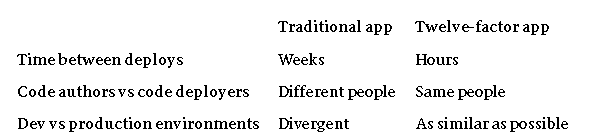
The twelve-factor app is configured for continuous deployment by making the development-production gap minimal. Referring to the three gaps identified above:
Make the time gap minimal: a developer can write code and make it live within hours or even minutes.
Keep the personnel gap small: developers who wrote code are directly involved in deploying it and seeing how it acts in production.
Reduce the tools gap: bring development and production as near as feasible.
Summarizing the above in a table:
Developers will be inclined to employ light backing services on their local setups, say SQLite locally and PostgreSQL on deployment, or local process memory for development-time caching with Memcached on deployment.
However, the twelve-factor developer resists temptation to employ different backing services in development and production, even where adapters theoretically remove disparities. Inconsistencies across backing services tend to introduce passive incompatibilities that cause code that has passed tests in development or staging but fail in production. These create friction, making continuous deployment harder and less consistent. The overall cost of this friction throughout the lifecycle of an application is substantial and can reverse the effectiveness of the development process.
The demand for light local services has faded. Modern supporting services like Memcached, PostgreSQL, and RabbitMQ are simple to install and configure with packaging utilities like Homebrew and apt-get. Further, declarative provisioning utilities like Chef and Puppet, along with thin virtual environments like Docker and Vagrant, make it possible for developers to closely mirror production environments on their local machine. It is cheap to implement such systems compared to the benefits of guaranteeing consistency between the development and production environments and continuous deployment.
While adapters for each of the backing services are still helpful in supporting the transition to new services, it is important that all of the app deployments — development, staging, and production — share the same type and version of each backing service. This ensures parity between environments and minimizes the risk of deployment issues.
11.Logs
“ treat logs as stream of events “
Logs are the stream of aggregated, time-ordered events collected from the output streams of all running processes and backing services. Logs in raw form are typically a one-event-per-line text format (though backtraces from exceptions may be several lines). Logs have no beginning or end, but drip steadily as long as the app is running.
A twelve-factor application never concerns itself with routing or storage of its output stream. It should not attempt to write to or manage logfiles. Instead, each running process writes its event stream, unbuffered, to stdout. When running locally, the developer will observe this stream in the foreground of his terminal to observe how the application is acting.
Implementation in Different Languages
Go — Logging to stdout
package main
import (
	"fmt"
	"log"
	"os"
)
func main() {
 // Create a logger that writes to stdout
 logger := log.New(os.Stdout, "INFO: ", log.Ldate|log.Ltime|log.Lshortfile)
 logger.Println("Application started...")
 fmt.Println("Processing request...")
 logger.Println("Application shutting down...")
}
Explanation:
- The logs are written to
stdout, which external log aggregators can capture. log.New(os.Stdout, …)ensures logs are properly formatted with timestamps and file references.
Python — Logging to stdout
import logging
import sys

# Configure logging to stdout
logging.basicConfig(
    stream=sys.stdout,
    level=logging.INFO,
    format="%(asctime)s - %(levelname)s - %(message)s"
)
logging.info("Application started")
logging.info("Processing request")
logging.info("Application shutting down")
Explanation:
- Logs are sent to stdout, ensuring they can be managed externally.
- The
loggingmodule allows proper formatting with timestamps.
Handling Logs in Containers (Docker & Kubernetes)
By default, Docker captures stdout and stderr logs, which can be accessed using docker logs <containerid>
In Kubernetes, logs can be accessed using: kubectl logs <podid>
Benefits of Treating Logs as an Event Stream:
✅ Simplifies Application Design → The app doesn’t manage
log files, reducing complexity.
✅ Enables Centralized
Logging → Logs from multiple instances can be collected and analyzed in one place.
✅ Enhances Debugging & Monitoring → Log aggregation
tools provide search, filtering, and alerting capabilities.
✅ Supports Scalability → Works well in containerized and
cloud environments.
12. Admin processes
“ Run admin/management tasks as one-off process”
Admin and management procedures, such as database migrations, scripting, and debugging, should execute as one-off processes and not embedded within long-running application code. They should execute in the same runtime environment as the app, by the same codebase, with the same configuration and dependencies.
Top Principles for Admin Processes of a Twelve-Factor App
1-)One-Off Execution
Admin operations are ephemeral
and execute manually or automatically on demand.
Examples: Database migrations, cache flushing, running
analytics reports, fixing corrupted data.
2-)Uses the Same Environment
Admin processes should
be run in the same runtime environment as the application.
They should share the same configuration,
dependencies, and services.
3-)Run Through the CLI or Task Runners
The process
should be run through a command-line interface (CLI) or an orchestration tool like Kubernetes Jobs, Celery
(Python), or Sidekiq (Ruby).
Example: Running rake db:migrate on a Ruby on Rails application.
4-)Stateless & Disposable
These tasks should not
have long-lived state and should be designed to run at will.
Implementation in Different Languages
Go (Golang) — Running a Migration Script
migrate.go
package main

import (
 "fmt"
 "log"
 "os"
 "os/exec"
)

func main() {
 // Load environment variables
 dbURL, exists := os.LookupEnv("DATABASE_URL")
 if !exists || dbURL == "" {
  log.Fatal("❌ DATABASE_URL is not set. Please provide a valid database connection string.")
 }

 // Define migration path and command
 migrationPath := "./migrations"
 migrateCmd := "migrate"

 // Run migration
 if err := runCommand(migrateCmd, "-database", dbURL, "-path", migrationPath, "up"); err != nil {
  log.Fatalf("❌ Migration failed: %v", err)
 }

 fmt.Println("✅ Database migration completed successfully!")
}

// runCommand executes a shell command and streams output
func runCommand(name string, args ...string) error {
 cmd := exec.Command(name, args...)

 // Attach standard output and error streams
 cmd.Stdout = os.Stdout
 cmd.Stderr = os.Stderr

 fmt.Printf("🚀 Executing: %s %v\n", name, args)
 return cmd.Run()
}
go run migrate.go
Python -Running a Migration Script
import os
import subprocess
import sys

def run_command(command):
    """Run a shell command and stream output."""
    try:
        print(f"🚀 Executing: {' '.join(command)}")
        result = subprocess.run(command, check=True, text=True, stdout=sys.stdout, stderr=sys.stderr)
        return result.returncode
    except subprocess.CalledProcessError as e:
        print(f"❌ Migration failed: {e}")
        sys.exit(1)

def main():
    """Main function to run database migrations."""
    db_url = os.getenv("DATABASE_URL")
    if not db_url:
        print("❌ DATABASE_URL is not set. Please provide a valid database connection string.")
        sys.exit(1)

    migration_path = "./migrations"
    migrate_cmd = ["migrate", "-database", db_url, "-path", migration_path, "up"]

    run_command(migrate_cmd)

    print("✅ Database migration completed successfully!")

if __name__ == "__main__":
    main()
13.API First
“ Treat API as a First-Class Citizen “
API-first is like to composing your
APIs with the predefined input and output parameter details in an API description language like Open API
Specification (Swagger). It takes a substantial amount of time to create the API contracts.
By
developing your API first, you can enable interaction with your stakeholders (your team, customers, or
possibly other teams within your company that would wish to consume your API) far in advance of when you
might have coded yourself into a corner. This collaboration allows users to then define user stories, mock
your APIs as you consume them, and document which can be used to further socialize the intent and
functionality of the service you’re developing. Most importantly, it minimizes inter-team dependencies
because contracts are negotiated and agreed upon much earlier.
Key Concepts of API First
✅ Define API contracts before writing application logic. Use tools like OpenAPI (Swagger) or GraphQL Schema to specify endpoints, request/response structures, and data models.
✅Security, documentation, and testing (e.g., Postman, Swagger, Pytest) are essential.
14.Telemetry
Telemetry allows real-time manageable application.
As we are building applications in the cloud, we may not have the possibility to debug and poke around the application to gain visibility and observe the application’s running like we typically do in our local machines.
Your application can be running anywhere in the cloud and across various instances in various locations.
You must be wondering why we need some separate telemetry when there is a logging principle already available under the twelve-factor app principles. Logging is more typically aimed at the internal app architecture, not real customer usage. Telemetry, on the other hand, is targeted at data gathering after the app has shipped in the wild. Telemetry and real-time instrumentation of the app enable developers to monitor their app’s health, performance, and vital signs in this complicated, highly distributed world.
Common Telemetry Tools and Integrations for 12-Factor Apps
- Logging Tools:
- Logstash (part of the ELK stack): Collects and transforms logs, which can be sent to Elasticsearch for aggregation and analysis.
- Fluentd: Collects logs, events, and metrics from the application and sends them to various storage or analysis tools.
- Papertrail: A hosted logging service that aggregates and searches logs.
- Datadog: Provides logs, metrics, and monitoring to get insights into application performance.
2. Metrics and Monitoring:
- Prometheus: An open-source monitoring and alerting toolkit that is commonly used to collect time-series data (metrics) from applications.
- New Relic: A software analytics and monitoring platform for real-time visibility into your apps.
- AppDynamics: A performance management solution for monitoring applications, identifying bottlenecks, and improving performance.
- Datadog: Provides real-time observability across your applications, with features for monitoring infrastructure, logs, and application performance.
3. Distributed Tracing:
- OpenTelemetry: An open-source project that provides APIs and instrumentation to collect telemetry data, such as traces, metrics, and logs, from applications.
- Jaeger: An open-source distributed tracing system for monitoring microservices and understanding application performance.
- Zipkin: A distributed tracing system that helps gather timing data from services and visualize request paths.
Benefits of Telemetry
✅Real-Time Insights: Telemetry enables real-time
tracking of application behavior and system performance.
✅Data-Driven Improvements: Helps in identifying issues,
making informed decisions, and optimizing system performance.
✅Distributed Systems Support: Essential for monitoring
complex, distributed, and microservices-based architectures.
✅Error Detection: Provides deep visibility into
application failures and user issues.
✅Resource
Optimization: Aids in ensuring efficient resource usage and reducing operational costs.
15.Authentication and Authorization
“If you think technology can solve your security problems, then you don’t understand the problems, and you don’t understand the technology.”
― Bruce Schneier
Security is a component of any application design. Security must be the first thing on your mind when discussing application deployment and design. No matter where you are deploying an application, you need to ensure this is designed in.
Best Practices for Authentication and Authorization
✅Use Stateless Authentication:
Authenticate users with JWT or other stateless authentication mechanisms, without saving session
information on the server.
✅Centralize Configuration: Store sensitive information, such as API keys and authentication tokens, in environment variables (Factor 3: Config), rather than hardcoding them in your application.
✅Take Advantage of Third-Party Providers: Simplify authentication through the use of outside services like Auth0, OAuth, or OpenID (Factor 5: Backing Services), thus lightening the administrative task of maintaining user identities in-house.
✅Utilize Role-Based Access Control (RBAC): Use RBAC or ABAC to structure user roles and permissions in a flexible, scalable manner.
✅Decouple Authentication from Authorization: Separate authentication and authorization logic from your application code, ideally in external services or microservices, to promote modularity and flexibility.
✅Have Scalable Authorization: Use JWT tokens to enable horizontal scalability (Factor 8: Concurrency) where authorization can occur across multiple instances of an app without falling back to storing sessions centrally.
Business Benefits of Fifteen-Factor Apps
While the Fifteen-Factor methodology helps developers develop a robust and resilient web app through continuous deployment, it also offers many business benefits.
- Elasticity
Web apps that comply with the Fifteen-Factor methodology can grow and shrink as needed. These apps can scale out when there is high traffic and scale in when the traffic is low, saving infrastructure costs. Also, scaling the SaaS app is more accessible as it does not require significant changes to the Fifteen-factor application architecture. - Modularity
A Fifteen-Factor App is designed mainly for developing modern and containerized cloud environments from scratch. Each component is tailored to cloud deployment flexibility in such an app while creating a standard for every third-party developer to follow. - Information Security
The Fifteen-Factor Methodology says that your credentials or confidential information should not be in the code repo but in the application’s environment. This ensures security and also enforces segregation of duties. - Continuous Integration
According to the Fifteen-Factor Methodology, your application is always stable version and easily maintainable application.
Making a conclusion
👨👦👦 Leave a comment, I am free for discussion with your any kind technical question.
#FifteenFactorApp #SaaSArchitecture #APIFirst #Telemetry #Authentication #Authorization #CloudDevelopment #SoftwareEngineering #BestPractices #ScalableApplications