
You Should Try Series-Tailscale VPN
Why you should use Tailscale VPN ?
Introduction
In this series, I am sharing my primarily used applications, which I really love and try to make more announcements to people to use their environment. I really love it , you should give one chance.
What is Tailscale ?
Tailscale is a modern, secure, and easy-to-use VPN solution built on WireGuard, offering simplicity, high performance, and strong security. It’s ideal for both individuals and organizations looking to create a secure, distributed network without the hassle of traditional VPN setups. Whether you are managing a few devices or scaling to hundreds of remote workers, Tailscale offers the flexibility and security you need with minimal overhead.
Some features are amazing and the simplest applications written over the VPN product. Such as:
- Deploy a zero-config, no-fuss VPN
- Securely access resources on any infrastructure
- Unlock site-to-site networking
Tailscale works on Mac, Linux, and Windows OS successfully . I am using a Basic Plan which is free and supports 100 devices. That is really enough for a small organization .
What i love ?
Currently, I am leading my startups as a solo founder. For that reason, I have several positions in my work. One of them is networking and security. Before the Tailscale, I was self-managing a private network IP base exist. Communication with a device needs custom solution, so that reason I was writing my own application.
After installing and using Tailscale, I have a secure private network within a few easy steps. Adding a new node is very easy. MagicDNS works great. After that, you can access your device in {machineName}.{Unique Tailscale Id}.ts.net format.
For Example: You have 5 machines like these :
Machine Name 1 : server-usa , work on
usa
Machine Name 2: server-uk , work on uk
Machine Name 3: server-eu , work on europe
Machine
Name 4: server-asia ,work on asia
Machine Name 5: server-japan , work on japan
After installing tailscale in your private network device communicate each other same domain name. Which is unique and do not share it.(.tailscale123.ts.net in this example). One of the reason for do not share the address for DDOS attack. After that you access them with network level.
http://server-usa.tailscale123.ts.net
http://server-uk.tailscale123.ts.net
http://server-eu.tailscale123.ts.net
http://server-asia.tailscale123.ts.net
http://server-japan.tailscale123.ts.net
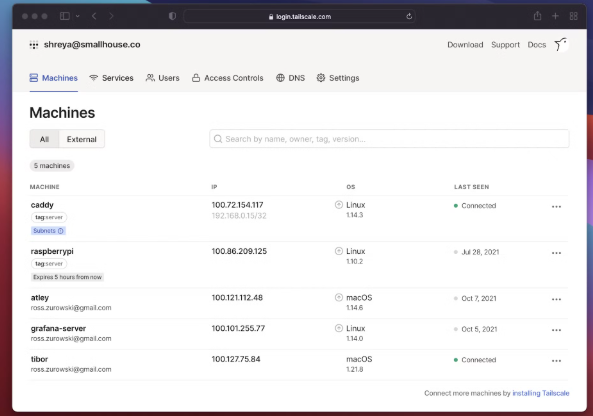
If you look the hosts file in your OS you can see that Tailscale MagicDNS modify it. After that in your private network your device can communicate each other via your own dns name.
Tailscale Funnel
Tailscale Funnel lets you route traffic from the broader internet to a local service running on a device in your Tailscale network (known as a tailnet). You can use it to share a local service, like a web app, for anyone to access — even if they don’t use Tailscale.
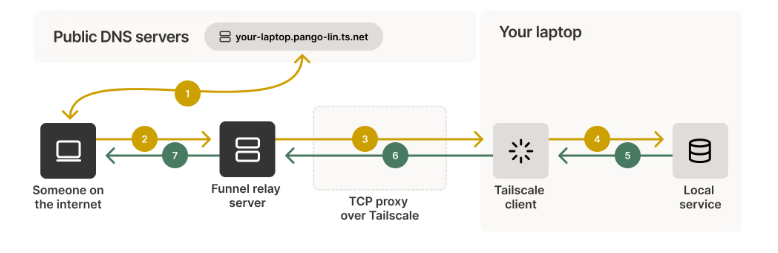
The backend services are a good start to the funnel, in my experience. If you value your data and privacy, this solution is to be considered. Also, a dedicated server, VPS, VDS, and colocation are pretty expensive. Tailscale provides the funnel option with your own data center easily.
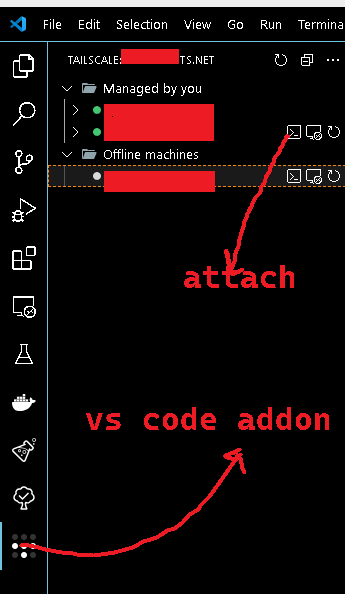
Visual Studio Code addon exist easily attach.
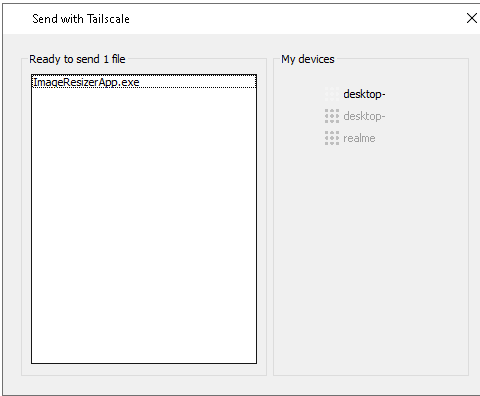
Send With Tailscale
One of the coolest features that I love too much is the easiest way of sharing your data in one click.
Notes
Tailscale is a huge application, and I am only sharing my experience part, which I was using for my development and production environment. For more complex usage and solution, look at the documentation.
https://tailscale.com/kb/1017/install
Making a conclusion
👨👦👦 Leave a comment, I am free for discussion with your any kind technical question.